[Library Network] Conditions of Use and Licensing Restrictions for E-Resource
Prohibited Actions When Using Electronic Resources
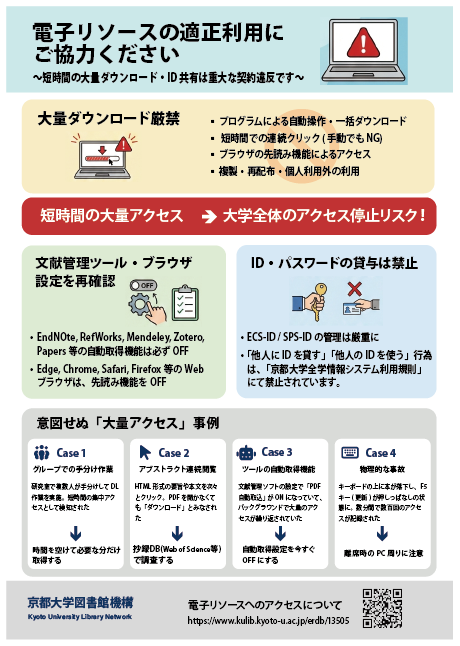
Mass Downloading Strictly Prohibited
- Automated operations or bulk downloads using programs
- Rapid consecutive clicks (prohibited even manually)
- Access via browser prefetch functions
- Copying, redistribution, or use beyond personal purposes
Cases of Unintentional "Excessive Access"
Cases where actions are considered "attacks" by system specifications are increasing, even without malicious intent.
Multiple people in a lab divided download tasks manually. Since the access source (university IP) was the same, it was detected as concentrated access in a short period.
Clicking through HTML abstracts and full texts one after another. Even without opening PDFs, the request frequency to the server was considered "downloading".
The "auto-import PDF" setting in reference management software was ON, causing repeated mass access in the background.
A book fell on the keyboard, holding down the F5 key (refresh). Hundreds of accesses were recorded in just a few minutes.
Essential! Settings Review Checklist
Reference Management Software (Turn OFF Auto-DL)
Prevent unintended background communication.
| Paperpile | Settings > Storage & Sync OFF "Automatically download PDFs" |
|---|---|
| EndNote Click Mendeley | Disable the extension or uncheck "Automatically add PDFs" in settings. |
| Zotero | Do not run "Find PDF" on multiple selections. Turn OFF Connector proxy settings when off-campus. |
| ReadCube | Do not use "LOCATE PDF" on multiple selections. |
Web Browser (Turn OFF Prefetch)
"Page loading speed improvement" features access sites in the background.
| EEdge | Settings > Cookies and site data OFF "Preload pages for..." |
|---|---|
| CChrome | Settings > Performance OFF "Preload pages" |
| SSafari | Preferences > Search OFF "Preload Top Hit in..." |
| FFirefox | about:config > network.prefetch-next false Change value to "false" |
Generative AI & Data Mining
* Uploading content to cloud-based generative AI may constitute copyright infringement.
Strict Account Management
"Lending your ID to others" or "using someone else's ID" is prohibited under Kyoto University's Information System Usage Regulations.
Posters & Flyers
[Database]British Library Newspapers VII: Southeast Asia
British Library Newspapers, Part VII: Southeast Asia, 1806–1977
Covering approximately 170 years of history,1806-1977, this module in the British Library Newspapers series consists of 36 newspapers and periodicals digitized from the British Library’s collections, including Malaysia, Singapore, Myanmar, and Thailand.
https://go.gale.com/ps/start.do?p=BNCN&u=kyotodai
[CSEAS Library]
[Database] Web of Science Research Assistant is Now Available
We are pleased to announce that Web of Science Research Assistant, an AI tool for literature searching, is now available.
Web of Science Research Assistant is a generative AI tool in Web of Science. It allows users to ask questions in natural language, including Japanese and English, and helps with finding relevant papers, reviewing literature, and exploring research trends and topics. Its answers are based on trusted data in Web of Science. Users can also check the source records and search criteria in the results.
We hope you will find this tool useful for literature surveys and topic exploration.
How to Use
Access Web of Science (via the authentication system).Then select the “Research Assistant” tab at the top of the screen.
Further Information
- Web of Science Help Center
https://webofscience.zendesk.com/hc/en-us/articles/31437630410129-Web-of-Science-Research-Assistant - Web of Science LibGuides
https://clarivate.libguides.com/authors/research-assistant
[Solved] Technical Issues with the E-Journal/Database Authentication System
The issue has been resolved. We apologize for the inconvenience. (March 9, 2026)
We are experiencing a technical issue with our E-Journal/Database Authentication System (As of March 8, 2026, 10:00 AM). When attempting to access electronic resources, the error message "EZproxy is currently unavailable. Please contact your system administrator for assistance" is displayed, and resources cannot be accessed.
We apologize for the inconvenience and ask for your patience while we work to restore service.
[University Library Electronic Resources Team]
[Library Network] Conditions of Use and Licensing Restrictions for E-Resource
Prohibited Actions When Using Electronic Resources
Mass Downloading Strictly Prohibited
- Automated operations or bulk downloads using programs
- Rapid consecutive clicks (prohibited even manually)
- Access via browser prefetch functions
- Copying, redistribution, or use beyond personal purposes
Cases of Unintentional "Excessive Access"
Cases where actions are considered "attacks" by system specifications are increasing, even without malicious intent.
Multiple people in a lab divided download tasks manually. Since the access source (university IP) was the same, it was detected as concentrated access in a short period.
Clicking through HTML abstracts and full texts one after another. Even without opening PDFs, the request frequency to the server was considered "downloading".
The "auto-import PDF" setting in reference management software was ON, causing repeated mass access in the background.
A book fell on the keyboard, holding down the F5 key (refresh). Hundreds of accesses were recorded in just a few minutes.
Essential! Settings Review Checklist
Reference Management Software (Turn OFF Auto-DL)
Prevent unintended background communication.
| Paperpile | Settings > Storage & Sync OFF "Automatically download PDFs" |
|---|---|
| EndNote Click Mendeley |
Disable the extension or uncheck "Automatically add PDFs" in settings. |
| Zotero | Do not run "Find PDF" on multiple selections. Turn OFF Connector proxy settings when off-campus. |
| ReadCube | Do not use "LOCATE PDF" on multiple selections. |
Web Browser (Turn OFF Prefetch)
"Page loading speed improvement" features access sites in the background.
| EEdge | Settings > Cookies and site data OFF "Preload pages for..." |
|---|---|
| CChrome | Settings > Performance OFF "Preload pages" |
| SSafari | Preferences > Search OFF "Preload Top Hit in..." |
| FFirefox | about:config > network.prefetch-next false Change value to "false" |
Generative AI & Data Mining
* Uploading content to cloud-based generative AI may constitute copyright infringement.
Strict Account Management
"Lending your ID to others" or "using someone else's ID" is prohibited under Kyoto University's Information System Usage Regulations.
Posters & Flyers