【附属図書館・吉田南総合図書館・桂図書館】KURENAI20周年記念展示開催(10/19-)
附属図書館、吉田南総合図書館および桂図書館にて、京都大学学術情報リポジトリ「KURENAI」の20周年を記念した展示を開催します。
2026年10月19日~25日に開催されるオープンアクセスウィーク(International Open Access Week)にあわせて、オープンアクセスへの取り組みに関連する資料を展示いたします。
また、附属図書館では展示会場と特設サイトで「キーワードクエスト」も開催します。ぜひお立ち寄りください。
【吉田南総合図書館会場】【桂図書館会場】
期間:2026年10月19日(月)~11月13日(金)開館時間中
場所:桂図書館 1Fラウンジ(10/30は休館)
吉田南総合図書館 1Fエントランスホール(10/28は休館)
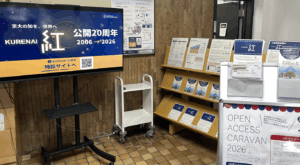 吉田南総合図書館[/caption][caption id="attachment_1410200" align="alignnone" width="300"]
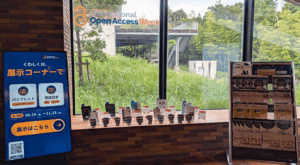 桂図書館[/caption]
【附属図書館会場】★キーワードクエスト開催★
期間:2026年10月26日(月)~11月30日(月)開館時間中
場所:1Fラーニングコモンズ
展示ポスターとKURENAI20周年記念特設サイトからキーワードを集めてオリジナルグッズをGETしよう!コンプリート特典も!
※本イベントは学内者限定です(日本語のみ)
- 参加方法:
①展示ポスターと特設サイトをチェック
②展示ポスターと特設サイトからキーワードさがしてメモ
③附属図書館カウンターでオリジナルグッズをGET! - 交換場所:
附属図書館 1F カウンター - 受付時間:平日9:00-20:00 / 土日祝10:00-18:00)
会期中には各館にて、オープンアクセスに関するセミナー(説明会)や個別相談会も開催します。
詳しくはこちらをご参照ください。
【図書館機構】京都大学学術情報リポジトリ「KURENAI」公開20周年:「オープンアクセスキャラバン」を開催します
[関連ウェブサイト]
KURENAI20周年記念特設サイト
オープンアクセスウィーク(International Open Access Week) 2026年のテーマ:「知識の代償 The Cost of Knowledge」
[関連ニュース]
https://www.kulib.kyoto-u.ac.jp/bulletin/1410079
https://www.kulib.kyoto-u.ac.jp/bulletin/1410127
[問い合わせ先]
附属図書館 repository[at]mail2.adm.kyoto-u.ac.jp
吉田南総合図書館 a30yslib[at]mail2.adm.kyoto-u.ac.jp
桂図書館 090sgakushi[at]mail2.adm.kyoto-u.ac.jp
【附属図書館】トークイベント「古代人の奔放なうた ー『詩経』をよみなおすー」を開催します(11/5)
『詩経』は全305篇からなる中国最古の詩集です。儒教の道徳を教えた経典として現代まで読み継がれてきましたが、意外にも純粋な恋愛詩を多く含んでいます。
このたび漢詩研究の第一人者である川合康三先生をお招きし、
おしえて! あなたのコア・ブック 第2回トークイベント 「古代人の奔放なうた ―『詩経』をよみなおす―」
を開催します。
※本イベントは学内者限定です。

第一部では川合先生にご自身の研究について語っていただきます。
続く第二部では『詩経』から数篇の詩を取り上げて読書会を行います。まず川合先生による講釈があり、その後、参加者同士が意見を交わし詩を鑑賞します。
正解は何でしょう、ではなくて、人それぞれ勝手な(?!)解釈をしましょう。
伝統にとらわれない自由な解釈で、今こそ『詩経』の本来のすがたに触れてみませんか。
第二部は参加申込みが必要です。以下の実施概要をご覧ください。
実施概要
・日時:2026年11月5日(木) 17:00 - 18:30
・場所:附属図書館 1階 ラーニング・コモンズ
・登壇者:
川合康三 名誉教授 [プロフィール]
(司会)宇佐美文理 特定教授(総合生存学館)[プロフィール]
・参加対象者:学内者限定、学生優先
・実施内容:
《第一部》講演会(30分) 座席30席(立ち見自由) ←申込み不要です。直接ご来場ください。
《第二部》読書会(1時間) 募集10名 ←要申込み。参加申込みフォームよりお申込みください。
参加申込みフォーム https://forms.gle/VEmyB8XYDCJMW2DY7
※申込み締切り 2026年10月30日(金) 17:00
※申込者には、読書会で取り上げる詩と、川合先生による講釈が付された資料をお送りします。そちらを参考に自分なりの解釈を考えてきてください。
※申込者以外の方も傍聴いただけます。どうぞご来場ください。
・主催:京都大学附属図書館
・問い合わせ先:附属図書館 利用支援課
E-mail: user-support-full660 [at] mail2.adm.kyoto-u.ac.jp
BioOneへのアクセス不具合について
現在、電子ジャーナル・データベース認証システム経由で"BioOne"のジャーナルにアクセスすると、エラー画面が表示され、利用できない状況が発生しています。
ご迷惑をおかけしますが、提供元において対応中ですので、復旧までしばらくお待ちください。
【附属図書館電子リソースチーム】
【図書館機構】京都大学学術情報リポジトリ「KURENAI」公開20周年:「オープンアクセスキャラバン」を開催します
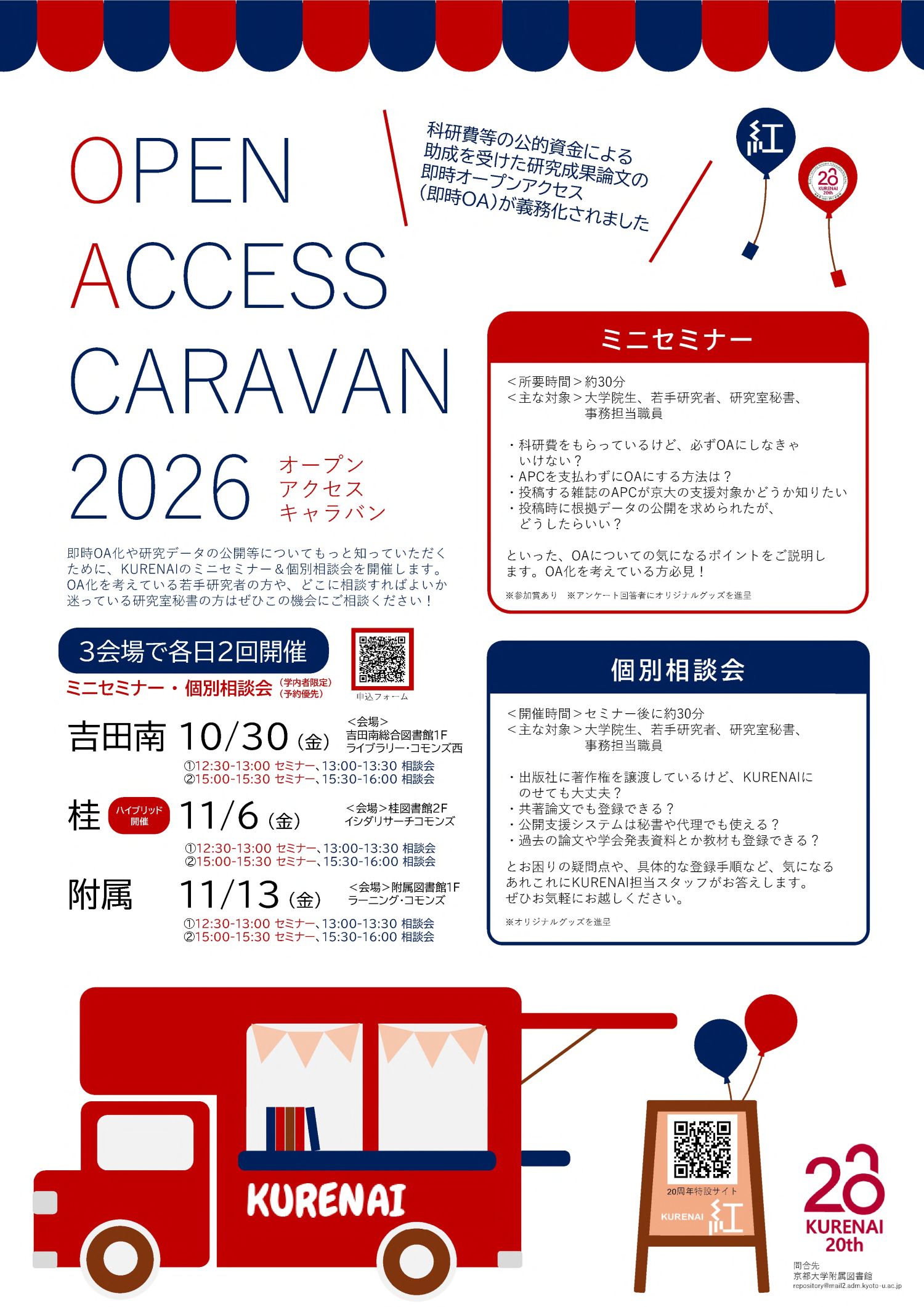
研究者の皆様のオープンアクセスに関する疑問や課題解決をダイレクトに支援するため、「オープンアクセスキャラバン」を開催いたします。
即時OA対応やAPC割引などをコンパクトに解説するミニセミナーと、個別の疑問にスタッフがお答えする個別相談会を実施します。
研究者や大学院生の皆様はもちろん、研究室秘書や事務担当職員の皆様も、お気軽にご参加ください。
1. 開催概要
- 対象:大学院生、若手研究者、研究室秘書、事務担当職員など ※学内者限定
- 形式:対面開催(※桂図書館会場のみオンライン配信ありのハイブリッド開催)
- Googleフォームからお申し込みください。席に余裕がある場合は、当日参加も可能です。
2. 日程・会場
各会場ともに1日2回実施します(内容は両回共通です)。
-
吉田南総合図書館:2026年10月30日(金)
- ① 12:30~13:30(セミナー 12:30-13:00 / 相談会 13:00-13:30)
- ② 15:00~16:00(セミナー 15:00-15:30 / 相談会 15:30-16:00)
- 会場:吉田南総合図書館 1F ラーニング・コモンズ西
-
桂図書館:2026年11月6日(金)[※ハイブリッド開催]
- ① 12:30~13:30(セミナー 12:30-13:00 / 相談会 13:00-13:30)
- ② 15:00~16:00(セミナー 15:00-15:30 / 相談会 15:30-16:00)
- 会場:桂図書館 2F イシダリサーチコモンズ(+Zoom配信)
-
附属図書館:2026年11月13日(金)
- ① 12:30~13:30(セミナー 12:30-13:00 / 相談会 13:00-13:30)
- ② 15:00~16:00(セミナー 15:00-15:30 / 相談会 15:30-16:00)
- 会場:附属図書館 1F ラーニング・コモンズ
3. プログラム
1. ミニセミナー(各回 約30分)
- 科研費等の即時OAの概要とKURENAIの役割
- 京都大学オープンアクセス方針
- APC割引の活用方法
- 研究データ公開の第一歩
- KURENAIの注目コンテンツ紹介
2. 個別相談会(セミナー後 各回 約30分)
「共著論文の登録方法は?」「手元に印刷版しかない場合は?」「KURENAI公開支援システムの使い方」など、日頃のお悩みや登録手順について専門スタッフがお答えします。
※ミニセミナーのみ、または個別相談会のみのご参加も大歓迎です。
4. 参加特典・お申し込み
セミナー参加者およびアンケート回答者・相談会参加者には、20周年記念のオリジナルグッズを進呈いたします。
以下のフォームよりお申し込みのうえ、ご参加ください。席に余裕がある場合は、当日参加も可能です。 ※学内者限定
5. KURENAI20周年特設サイト
KURENAIの歩みとオープンアクセスの未来をめぐる特設ページを公開中です。ぜひご覧ください。

[附属図書館研究支援第三掛]
投稿: 2026-10-16
【医学図書館】SMART Imagebaseオンライン講習会(11/6・医学系データベース講習会第3弾)
本学で利用可能な医学系データベース「Scientific & Medical ART Imagebase (SMART Imagebase)」について、データベース提供者を講師に招き、講習会を行います。
〈ポイント〉
★基本的な説明から行うので、初心者でも安心です。また新機能の紹介もあり、使い慣れた方もさらにスキルアップできます。
★参加申込み時に事前質問が可能です。データベース提供者に直接質問できる貴重な機会ですので、使い方の疑問、特定の検索内容についての相談など、何でもお知らせください。
★開催後、講演部分は録画配信を予定しています。詳しくは医学図書館webサイトのニュースでご確認ください(講習会参加の方へは、録画公開後に、個別にご連絡を差し上げます)。
講習会内容
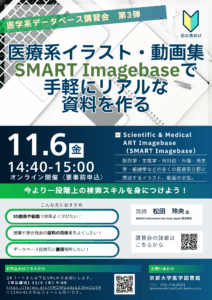
タイトル: 医学系データベース講習会第3弾「医療系イラスト・動画集SMART Imagebaseで手軽にリアルな資料を作る」
日時: 2026年11月6日(金)14:40-15:00
場所: オンライン(Zoom)
対象: 京都大学に身分を置く学生・教職員
申込み方法:次のWebフォームからお申込みください。
https://forms.gle/eHaxwpkbcMdsYiDX7
※第2弾(CINAHL)と同一の申込みフォームです。片方のみでも両方でも、どちらでも参加できます。
※参加申込者へは開催日当日10時までにオンライン接続情報等をお知らせします。
申込み締切: 2026年11月5日(木)9:00まで
主催・連絡先:医学図書館
E-mail:igakueturan[at]mail2.adm.kyoto-u.ac.jp
TEL: 075-753-4323
対象データベース
・Scientific & Medical ART Imagebase (SMART Imagebase)
URL: https://ebsco.smartimagebase.com/
解剖学・生理学・外科術・外傷・発生学・組織学などの多くの医療系分野に関連する、20,000点以上の高品質なイラスト、動画の全集です。画像は講義資料、プレゼンテーション、試験問題、Web教材の素材などにダウンロード・編集して活用することができます。
講習内容(講師からの案内)
・SMART Imagebaseの紹介
・医学画像・アニメーションの検索と閲覧
・コンテンツのダウンロードと活用方法
・質疑応答
参加申し込みされた方へ
参加にあたり、使用する端末のWebブラウザにデータベース利用の設定を行ってください。
設定方法:電子リソースへのアクセスについて
https://www.kulib.kyoto-u.ac.jp/erdb/13505
その他の医学系データベース講習会
・10月27日(火):Cochrane Library[申込受付中] 詳細:https://www.kulib.kyoto-u.ac.jp/?p=1410090
・11月6日(金):CINAHL[申込受付中] 詳細:https://www.kulib.kyoto-u.ac.jp/?p=1410093
[医学図書館] (2026.10.15投稿)