[Maintenance]Temporary Suspension of Services Using Short-term IDs for E-resource Access (Monday, Nov. 9, 2026, at 12:00 JST)
Due to server maintenance, the following services will be unavailable for approximately 10 minutes starting from 12:00 on Monday, Nov. 9, 2026.
[Date and Time]
Monday, Nov. 9, 2026, 12:00 - approx. 12:10 JST
[Affected Services]
- Access to electronic resources using Short-term IDs
(Note: Access via ECS-ID/SPS-ID will remain available as usual.) - Access to related websites
- Access to Authentication System Frequently Asked Questions (FAQ)
https://ninsho-log4.kulib.kyoto-u.ac.jp/ezproxy/authentication_faq_ja.html
- Access to Authentication System Frequently Asked Questions (FAQ)
- Access to the Authentication System Initial Agreement & Setup Page
https://www.kulib.kyoto-u.ac.jp/erdb/13505
- Access to the Authentication System Initial Agreement & Setup Page
Services will resume as soon as the maintenance is complete.
We sincerely apologize for any inconvenience this may cause and appreciate your understanding and cooperation.
[Library System Section, Main Library]
Notice Regarding Access Issue with Lexis+ UK
Currently, when attempting to access Lexis+ UK journals via the E-Journals & Databases Authentication System from off-campus, an error screen is displayed, making the service unavailable.
We apologize for the inconvenience and have requested the provider to resolve the issue. Please wait a while for service restoration.
In the meantime, "Lexis+ UK" can still be accessed directly from the campus network (KUINS).
Thank you for your patience and understanding.
[E-Resources team, Kyoto University Main Library]
[Maintenance] Asahi Shimbun Cross-Search (Nov 5, 2026, 18:00–20:30)
Please be advised that system maintenance will be performed on Asahi Shimbun Cross-Search during the period listed below.
Due to this maintenance, certain functions and image viewer features will be temporarily unavailable.
■ Schedule
Thursday, November 5, 2026, 18:00 – 20:30 (JST, estimated)
Note: The maintenance period may be subject to slight changes depending on progress.
■ Affected Features & Services
The following image viewing features will be unavailable during the maintenance window:
Clipping Image Viewing Unavailable: "Articles 1985–", "Regional Sections Search (Beta)"
Page Image Viewing Unavailable: "Reduced-size Edition –1999", "National Regional Sections", "Regional Sections Search (Beta)", "Asahi Graph"
■ Other Features
Other features, including search result listing, will remain operational as usual.
Please note that the system may experience temporary instability or slow response times during the maintenance period. Thank you for your understanding.
[E-Resources team, Kyoto University Main Library]
[Maintenance] WorldCat Discovery (November 12, 2026)
Please be advised that WorldCat Discovery, provided by OCLC, will undergo scheduled service maintenance during the period listed below.
Scheduled Date & Time: Wednesday, November 12, 2026, around 1:00 PM - 5:10 PM (Approx. 4 hours and 10 minutes)
Affected Service: WorldCat Discovery During this time, there may be connection problems with the above services.
We apologize for any inconvenience this may cause during the maintenance window and greatly appreciate your understanding and cooperation.
Information regarding scheduled maintenance and system outages is also available on the OCLC System Status Dashboard, which is updated in real-time 24 hours a day.
https://oclc.service-now.com/status
[E-Resources team, Kyoto University Main Library]
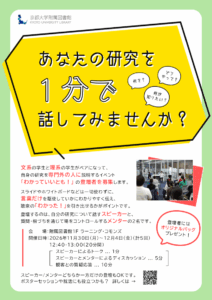
[Main Library] Seeking Participants for a talk event in June ”Wakatte-iitomo! (わかっていいとも!)” - One-Minute Research Talks: An Interdisciplinary Exchange Event for fellow students
“Wakatte-iitomo! (わかっていいとも!)” is a talk event where students from humanities and sciences pair up to explain their research.
Participants will act as Speaker and Mentor:
- Speaker: explain their research
- Mentor: liven up the discussion with questions and reactions
The speaker and mentor will discuss in front of the audience, bridging the gap between humanities and sciences.
They are supposed to discuss without using a presentation slide or whiteboard.
The point is devising a plan to explain their research clearly.
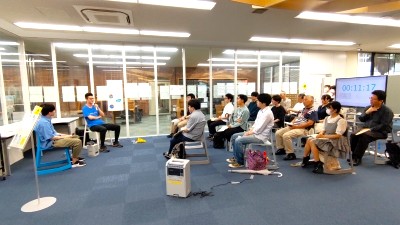
↑ Photo from the previous event
We are looking for participants (both speakers and mentors). Applications for speaker positions only or mentor positions only are also welcome.
Subject: Kyoto University students
We’ll be giving away the library’s original tote bag to all speakers and mentors!
This might come in handy for job interviews or poster sessions at academic conferences.
We look forward to receiving your application!
(If there are a large number of applications, we may need to make adjustments.)
Apply at this link: https://forms.gle/KdcquR8iqyPkM95p7
Event Details:
- Date: November 30 (Mon) - December 4 (Fri), 2026
- Hour: 0:40 pm - 1:00 pm
- Venue: Learning Commons (Southeast area), 1st floor, Main Library
- Time Schedule:
- presentation by the speaker: 1 minute
- discussion with a mentor: 5 minutes
- Q&A session from the audience: 10minutes - Promoter: Bunri Usami (Program-Specific Professor, Graduate School of Advanced Integrated Studies in Human Survivability), Hideharu Numata (Professor Emeritus)
- Organizer: Kyoto University Library
- Co-host: Hyakumanben-Dangi (百万遍談議) staff, Office of Research Acceleration
Contact:
User Support Division, Kyoto University Library
E-Mail: user-support-full660 [at] mail2.adm.kyoto-u.ac.jp