【Library Network : for faculty members】Request for recommendations of eBooks for student use in the second semester
※Recommendation form closed. Thank you for a lot of eBooks recommendations. (Oct. 19, 2020)
※Added about eBooks ineligible for recommendation. (Sep. 15, 2020)
Due to the current situation regarding the novel coronavirus (COVID-19), most courses in the second semester of AY 2020 will continue to be provided online. The Library Network provides students with eBooks for home study. To help us provide a wider range of eBooks, we would like to ask for your recommendations of eBooks that you think would be useful for students.
Persons eligible to make recommendations
All Kyoto University faculty members (Including part-time lecturers)
eBooks eligible for recommendation
・eBooks that will be used for liberal arts and sciences (ILAS) courses in AY 2020, or that will be useful for students taking those courses.
・eBooks that will be used in undergraduate courses in AY 2020, or that will be useful for students taking those courses.
・eBooks that would be useful for undergraduate students studying at home.
eBooks ineligible for recommendation
・Complete works, journals (including back numbers), newspapers
・Study guide, workbooks, self-help books and books of hobbies and practical use
・eBooks that extra costs will be charged next year (ex: contract maintenance fee, platform usage fee)
How to make a recommendation
Please use the recommendation form
Note: if you wish to recommend more than two eBooks, please enter the titles in order of priority.
Deadline for recommendations
Finished. Thank you for a lot of eBooks recommendations. October 16, 2020
Please note
・eBooks will be purchased in the order that recommendations are received.
・We may not be able to purchase all of your recommendations due budget limitations and order of purchasing priority.
・We will endeavor to purchase recommended eBooks that could not be purchased in this budget period in a subsequent budget period.
・We cannot purchase eBooks which are not sold to academic institutions. Please refer to the list of titles which are sold to academic institutions at the "For reference" below.
・eBooks purchased will generally only be accessible by one user at a time.
Contact
Acquisition and Cataloging Section, Kyoto University Library
Email: shiryoseibi660 [@] mail2.adm.kyoto-u.ac.jp
For reference
・Titles which are already owned by Kyoto University can be searched via KULINE.
・List of titles which are available to academic institutions
Titles are sorted by platform and classified by type. Please use the classifications to narrow down the lists. Some titles are provided in multiple platforms
*Please note that the files are large, so downloading them may require some time.
*Due to the large size of the files, they may not be viewable on some smartphones and tablets.
[Japanse books] (Excel, approx. 18MB) On-campus access only | ・List1 Provided by the Maruzen eBook Library ・List2 Provided by the KinoDen ・List3 Provided by the EBSCO eBooks |
[Non-Japanese books 1] (Excel, approx. 13MB) On-campus access only | ・List1 Provided by the Brill, the Cambridge, the Oxford, the Taylor & Francis, the Wiley, the World Scientific(titles published after 2015 only) ・List2 Provided by the EBSCO eBooks(titles published after 2015 only) |
[Non-Japanese books 2] (Excel, approx. 66MB) On-campus access only | ・List1 Provided by the ProQuest eBook Central(titles published after 2015 only) |
・ Although the number of eBooks available to academic institutions is smaller than the number available to individuals, it still comprises a very large number of titles. The lists include only a partial selection of the eBooks that are available, so please do not hesitate to recommend eBooks that are not included in the lists, and we will check their availability.
Your help and cooperation is greatly appreciated. Your recommendations help us to enhance our eBook collection, and will also be used as reference when requesting publishers to provide digital versions of their books.
(日本語) 【図書館機構】図書館システムにおける教職員データ誤登録の発生について(お詫び)
[ONLINE Lecture] How to use the "eol" database (Oct.15-22)
有価証券報告書、各種の届出書・報告書、決算短信や適時開示書類等を収録したデータベース eol のオンライン講習会を開催します。YouTubeにて専用動画を公開します。
就職活動にも役立つデータベースです。会計・マーケティングを研究している研究者・学生の方々はもちろん、それ以外の学生の方、就職担当で企業分析に携わっている教職員の方もぜひご視聴ください。
日 時:2020年10月15日(木)~10月22日(木)
実施方法:オンライン開催(YouTube視聴型)
対 象:学内者
動画作成:株式会社プロネクサス
視聴方法:専用ページよりYouTubeにアクセスしてください。
http://www.econ.kyoto-u.ac.jp/library/eolguidance (学内限定)
※上記ページは学内限定公開です。
学外から視聴される際はIKEv2等の設定をしてください。
情報環境機構 IKEv2
http://www.iimc.kyoto-u.ac.jp/ja/services/kuins/vpn/ikev2.html
※YouTubeの専用動画のURLは、学内者以外には共有しないでください。
お問合せ:経済学研究科・経済学部図書室
(TEL) 075-753-3412
(E-mail) 040etsuran*mail2.adm.kyoto-u.ac.jp(*を@に変えてください)
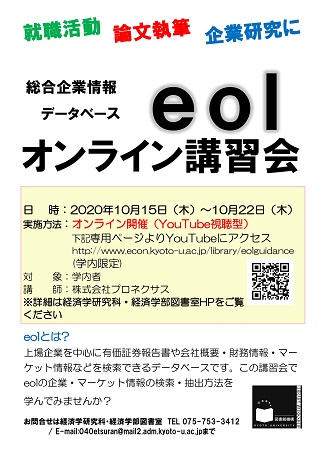 |
●eolとは?
上場企業を中心に有価証券報告書や会社概要・財務情報・マーケット
情報などを検索できるデータベースです。
– 学内環境からのみアクセス可
– 同時アクセス数2
京都大学図書館 -電子ジャーナルリスト-
– https://www.kulib.kyoto-u.ac.jp/erdb?c=erdb_alpha_e
【経済学研究科・経済学部図書室】
【Online Workshop】How to use online reference management software"EndNote Basic"(9/29,13:30-)
[Economics Library] Book exhibition
経済学部図書室資料展示
「先輩からのおすすめ本」
(11/13記)展示の開催期間を12月14日まで延長します。引き続きご利用ください。

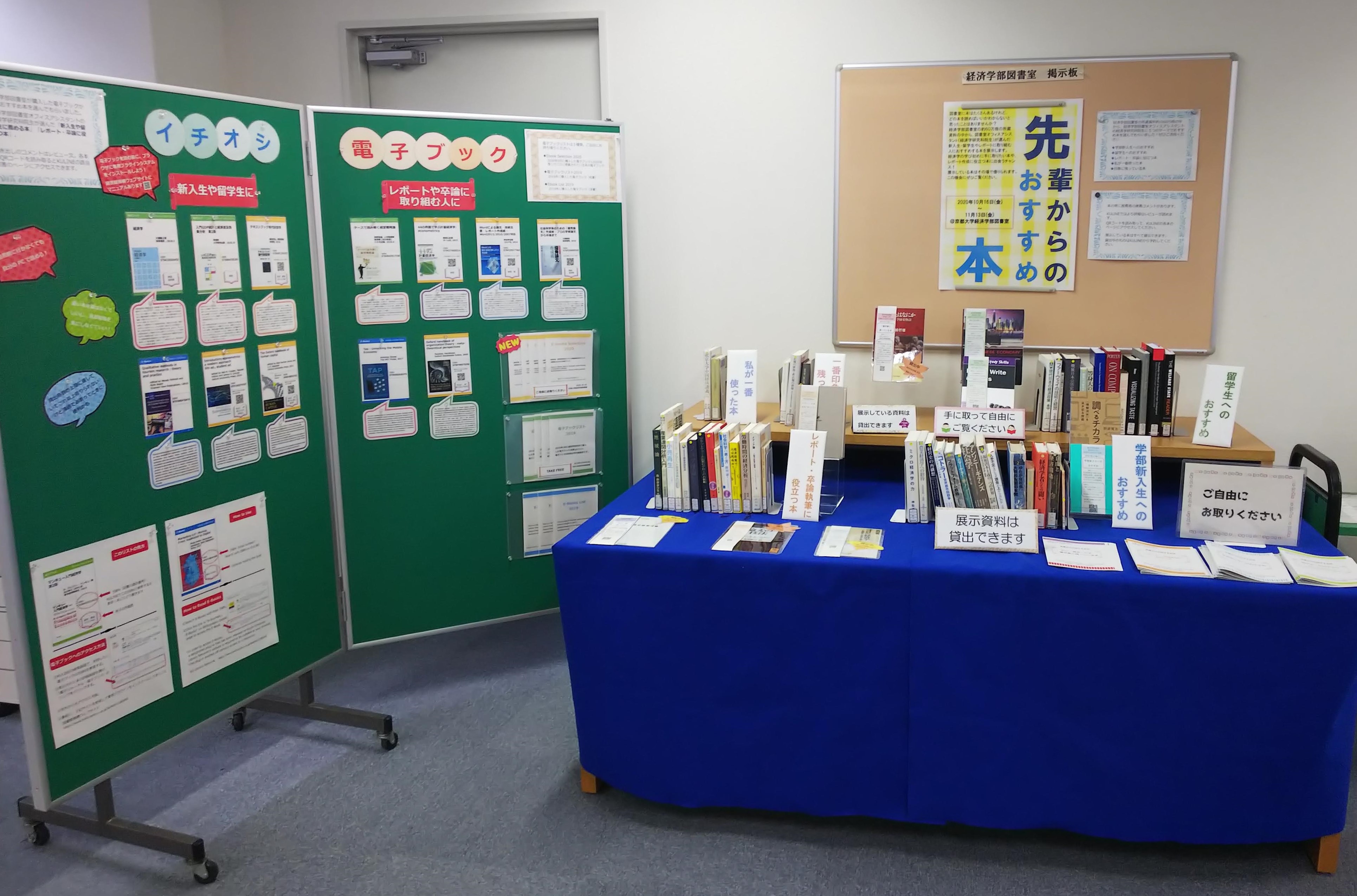
図書室に本はたくさんあるけれど、どの本を読めばいいかわからないと思ったことはありませんか?
経済学部図書室の約60万冊の所蔵資料の中から、図書室オフィスアシスタント(経済学研究科院生)が選んだ新入生・留学生やレポートに取り組む人におすすめする本を展示します。
経済学の学び初めに手に取りたい本や、レポート作成に役立つ本に出会うチャンス!展示している本はその場で借りられます。
この機会にぜひご覧ください。
■開催期間:2020年10月16日(金)~12月14日(月) ※延長しました
■場所:経済学部図書室 閲覧室内特設コーナー
■展示資料:先輩からのおすすめ本(経図展示2020)
*上記リンクから展示資料がKulineで一覧できます。
■資料リスト
学部新入生へのおすすめ
留学生へのおすすめ Recommended for international students
レポート・卒論執筆に役立つ本
私が一番使った本 / 一番印象に残っている本
*各テーマに沿って図書室オフィスアシスタントに本を推薦してもらいました。KULINEの各本のページにレビューを掲載しています。そちらも本を選ぶ参考にしてください。
【経済学研究科・経済学部図書室】(2020.10.04)