【Main Library】Library Calendar vol.December 2018 issued
We issued the Kyoto University Library Service News(LSN) vol.December 2018.
Written in Japanese and English with the library calendar for 3 months.
Take it at the Main Library or Coop Stores.
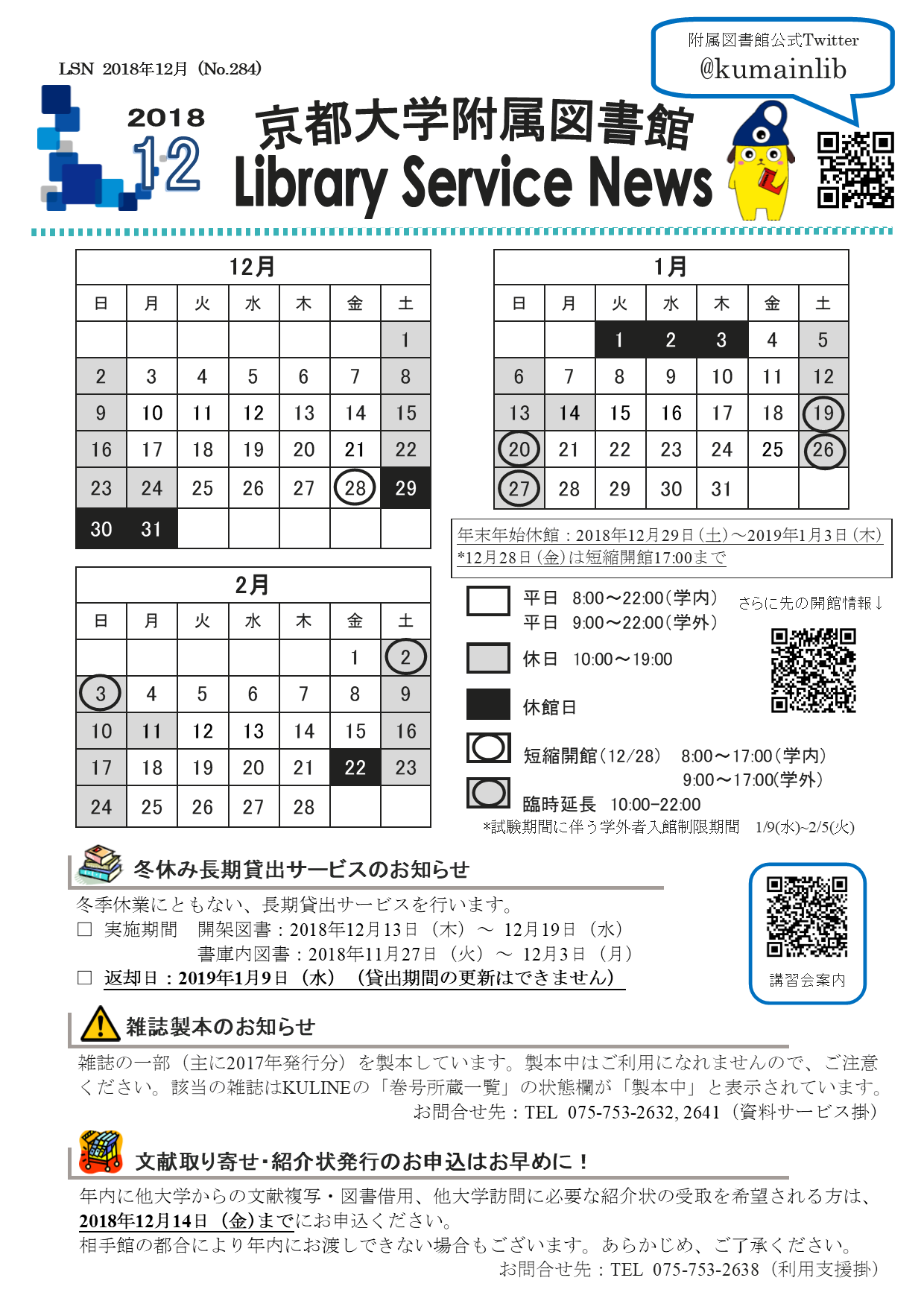
The Back numbers are available on the Kyoto University Repository "KURENAI".
[Library Network] Warning: Large volume access using pre-read browser functions
*For the latest information, see
[Attention!] Regarding Bulk Access to Electronic Resources Due to Automatic Download Features of Reference Management Tools and Browser Preloading Functions
(2024/07/26)
Accessing large volumes of data over short periods of time during use of electronic journals, e-books, databases may be regarded as a breach of contract and thus result in suspension of access to such services for Kyoto University as a whole by their providers.
ref: Conditions of Use and Licensing Restrictions for E-Resources
There have been frequent recent occurrences of users unintentionally downloading or accessing large volumes of data using pre-read browser functions.
Pre-read browser functions continually access links within pages in the background while pages are being viewed. As a result of this, large volume data downloads or large volume access of which the user is unaware may occur, even if the user intends to use electronic journals in the standard way.
We request your cooperation in disabling these functions by making the below changes to your browser settings. Be aware that there have been many reports of this happening with Microsoft Edge in particular.
- Microsoft Edge
- Open Settings > Advanced Settings
- Set "Use page prediction to speed up browsing and improve reading view" to off.
- Internet Explorer 11
- Open Internet Options > Advanced tab
- Under "Browsing" uncheck the box "Load sites and content in the background to optimize performance"
- Google Chrome
- Open Settings > Show Advanced settings
- Set "Use a prediction service to load pages more quickly" to off.
- FireFox
- Type “about:config” in the URL bar and press Enter.
- If the “This might void your warranty” warning is displayed, click "I’ll be careful I promise"
- On the configuration screen double-click "network.prefetch-next" and set to "false."
- Safari (Mac)
- Open “Preferences” from the Safari menu bar
- On the “Search” tab uncheck “Preload Top Hit in the Background”
Electronic Resources Team:
https://www.kulib.kyoto-u.ac.jp/form/14106
[Library Network]
[Maintenance]Other University Search Servie of KULINE(2018/11/29)
The Other University Search Servie of KULINE will be suspended temporally due to the NACSIS-CAT maintenance.
■[NII] About NACSIS-CAT maintenance (Nov.29(Thur.),2018 17:30-21:00)
https://www.nii.ac.jp/CAT-ILL/2018/11/20181129.html (Japanese only)
We are sorry for the inconvenience and thank you for your understanding.
[Library Network]
Service restored -[Maintenance] Kyoto University Rare Materials Digital Archive (11/29)
The Maintenance work was completed (2018/11/29 10:45) and the service has been restored.
Kyoto University Rare Materials Digital Archive will suspend its service due to the system maintenance for about an hour from 10:00am, November 29, 2018.
The service will be restored as soon as the maintenance work has been completed.
Thank you for your understanding.
[Maintenance] Taylor & Francis Online (Dec. 4-5)
Taylor & Francis Online will be unavailable for up to 16 hour from Tuesday 4th December at 14:00, to Wednesday 5th December at 06:00 (JST).
Thank you for your cooperation.
[Main Library Academic Support Section]