[Library Network] Conditions of Use and Licensing Restrictions for E-Resource
Prohibited Actions When Using Electronic Resources
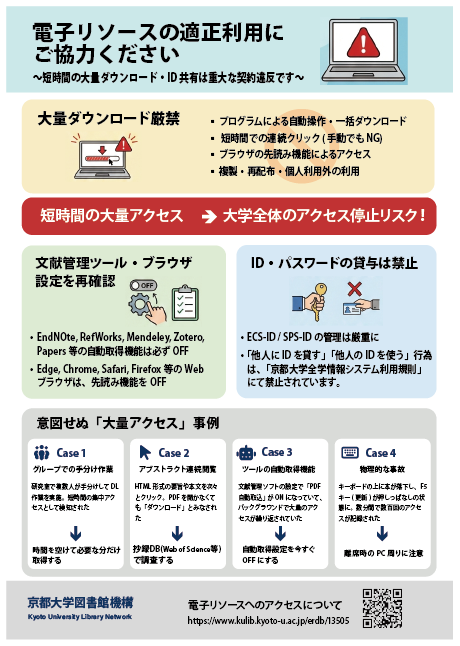
Mass Downloading Strictly Prohibited
- Automated operations or bulk downloads using programs
- Rapid consecutive clicks (prohibited even manually)
- Access via browser prefetch functions
- Copying, redistribution, or use beyond personal purposes
Cases of Unintentional "Excessive Access"
Cases where actions are considered "attacks" by system specifications are increasing, even without malicious intent.
Multiple people in a lab divided download tasks manually. Since the access source (university IP) was the same, it was detected as concentrated access in a short period.
Clicking through HTML abstracts and full texts one after another. Even without opening PDFs, the request frequency to the server was considered "downloading".
The "auto-import PDF" setting in reference management software was ON, causing repeated mass access in the background.
A book fell on the keyboard, holding down the F5 key (refresh). Hundreds of accesses were recorded in just a few minutes.
Essential! Settings Review Checklist
Reference Management Software (Turn OFF Auto-DL)
Prevent unintended background communication.
| Paperpile | Settings > Storage & Sync OFF "Automatically download PDFs" |
|---|---|
| EndNote Click Mendeley |
Disable the extension or uncheck "Automatically add PDFs" in settings. |
| Zotero | Do not run "Find PDF" on multiple selections. Turn OFF Connector proxy settings when off-campus. |
| ReadCube | Do not use "LOCATE PDF" on multiple selections. |
Web Browser (Turn OFF Prefetch)
"Page loading speed improvement" features access sites in the background.
| EEdge | Settings > Cookies and site data OFF "Preload pages for..." |
|---|---|
| CChrome | Settings > Performance OFF "Preload pages" |
| SSafari | Preferences > Search OFF "Preload Top Hit in..." |
| FFirefox | about:config > network.prefetch-next false Change value to "false" |
Generative AI & Data Mining
* Uploading content to cloud-based generative AI may constitute copyright infringement.
Strict Account Management
"Lending your ID to others" or "using someone else's ID" is prohibited under Kyoto University's Information System Usage Regulations.
Posters & Flyers

- 【Library Network : for faculty members】Request for recommendations of eBooks for student use in second semester AY2026 (2026-09-01)
- Service restored -[Maintenance] Kyoto University Rare Materials Digital Archive (Aug. 18) (2026-08-13)
- (Resolved) [System Trouble]KULINE (2026-08-13)
- [Maintenance] "KURENAI" "KURENAI Deposit System" will be temporarily inaccessible(08/13 7am-2pm) (2026-08-05)
- [Library Network] Conditions of Use and Licensing Restrictions for E-Resource (2026-08-03)
- [Library Network] Kyoto University Library Stamp Collecting in Open Campus 2026 (Aug. 6-7) (2026-07-31)
- [Maintenance] Kyoto University Library Network Web sites and related websites (Aug. 14, 2026) (2026-07-30)
- Service restored -[Maintenance] Kyoto University Rare Materials Digital Archive (Aug. 13) (2026-07-30)
- [Maintenance] "KURENAI" "KURENAI Deposit System" will be temporarily inaccessible(07/30 8:00-11:00) (2026-07-29)
- [Completed][Maintenance] Temporary Suspension of Library Network Services (KULINE, etc.) (A few minutes between 8:00-9:00 on Aug. 17, 2026 ) (2026-07-28)
