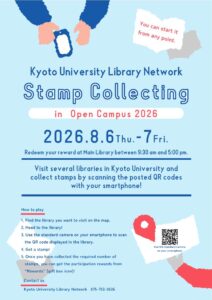
[Library Network] Kyoto University Library Stamp Collecting in Open Campus 2026 (Aug. 6-7)
The Kyoto University Library Network is hosting a Stamp Collecting during the Kyoto University Open Campus 2026 (August 6-7, 2026).
Visit several libraries within Kyoto University, scan the posted QR codes with your smartphone, and collect stamps!
Depending on the number of stamps you collect, you can receive original library wallpapers and goods.
If you're curious about where university students study or what a university library is like, please join us.
Anyone can participate. (Including KU members)
Event Website - Kyoto University Library Stamp Collecting -
Accessible only via smartphone.
* If you access this from a PC or tablet, Shin Map will be displayed.
https://platinumaps.jp/d/kulib?sr=1880
Recommended Environment:
- iPhone: iOS 13 or later + Safari (browser)
- Android: Android 10 or later + Chrome (browser)
Period
August 6 (Thu.) - 7 (Fri.), 2026
* Redeem your reward at the desk at Main Library between 9:30 am and 5:00 pm.
Checkpoints
- Main Library (3 stamp points)
- Yoshida-South Library (2 stamp points)
- The Library of the Graduate School of Letters and Faculty of Letters
- Graduate School of Education and Faculty of Education Library
- The North Library, Graduate School of Engineering and Faculty of Engineering
- The South Library, Graduate School of Engineering and Faculty of Engineering
- Graduate School of Informatics Library
- Faculty of Science Common Library
- Mathematical Library, Graduate School / Faculty of Science
- Graduate School / Faculty of Agriculture Library
- RIMS Library
- Medical Library
- Library of Human Health Sciences
- Library of Graduate School of Pharmaceutical Sciences and Faculty of Pharmaceutical Sciences
* You can start the Stamp Collecting from any point.
Notes
- For details on how to participate in the Stamp Collecting and the terms of use, please refer to the above website.
- We ask for your cooperation in answering a questionnaire regarding your age and place of residence when you participate.
Contact Us
Kyoto University Library, User Support Division
E-mail: user-support-full660 [at] mail2.adm.kyoto-u.ac.jp
[Maintenance] Kyoto University Library Network Web sites and related websites (Aug. 14, 2026)
Kyoto University Library Network, Main Library, Yoshida-South Library and Law Library web site etc.(on "kulib.kyoto-u.ac.jp") will suspend its service due to the system maintenance for about 1 hour from 12:00 PM, Aug. 14th, 2026.
The service will be restored as soon as the maintenance work has been completed.
Thank you for your understanding.
[Main Library, Library System Section]
[System Maintenance] WorldCat Discovery (August 2, 2026)
Please be advised that scheduled service maintenance will be performed on WorldCat Discovery (provided by OCLC) according to the following details:
[Maintenance]
Scheduled Date & Time: Sunday, August 2, 2026, approx. 12:00 PM – 3:55 PM JST(approx. 3 hours 55 minutes)
Affected Service: WorldCat Discovery
During this period, temporary connection disruptions may occur when accessing the affected service. We apologize for any inconvenience this may cause and greatly appreciate your understanding and cooperation.
For the latest updates, information on scheduled maintenance and system outages is available in real time on the OCLC System Status dashboard.
https://oclc.service-now.com/status
[E-Resources team, Kyoto University Main Library]
Service restored -[Maintenance] Kyoto University Rare Materials Digital Archive (Aug. 13)
The Maintenance work was completed (2026/8/13 11:30) and the service has been restored.
Kyoto University Rare Materials Digital Archive will suspend its service due to the system maintenance for about 3 hours from 9:00 am, August 13, 2026. The service will be restored as soon as the maintenance work has been completed. Thank you for your understanding.
[Maintenance] "KURENAI" "KURENAI Deposit System" will be temporarily inaccessible(07/30 8:00-11:00)
KURENAI and KURENAI Deposit System will be temporarily unavailable for maintenance during the following time:
- Date: July 30th, 2026 (Thursday)
- Time: 8:00 AM - 11:00 AM (JST, estimated)
We apologize for the inconvenience and appreciate your cooperation.
If you wish to register for KURENAI during the suspension period, please contact us using the following procedure.
- If there are co-authors, please obtain permission from all co-authors in advance to register with KURENAI.
Reference: Email template for obtaining co-author consent (Word file) *Please edit as needed. - Please refer to the Copyright Transfer Agreement and check whether the publisher permits self-archiving in the author's institutional repository. If you are uncertain of the publisher policy, please contact us.
- Please send us two documents listed below;
[1] Kyoto University Research Information Repository Registration Form (Word file)
[For current faculty members] [Japanese] [English]
*Please fill in the information and send this form via intra-campus mail or the Kyoto University e-mail (kyoto-u.ac.jp).
*Students are required to include their faculty research supervisor's e-mail addresses with the Kyoto University's domain name in CC.
[To those who are not currently affiliated with Kyoto University] [Japanese] [English]
*Please fill in the information, stamp it, and send it via e-mail (please attach scanned data of the registration form).
[2] Data files of article (main text, figure, and tables) (Please attach the file to an e-mail)
[Repository Section, Main Library]
Posted: 2026-07-29