[Main Library] Book delivery service for KU members
The Main Library will start the book delivery service for KU members.
- Period: June 8, 2020 until further notice
- Users: KU members who live outside Kyoto City and
KU members who can not come to the library for health reasons - Items:Books from the open shelves and the stack rooms and Journals
*Books bound in traditional Japanese styles can not be borrowed.
*Some items might not be borrowed depends on the material conditions.[Application process]
Users can apply for the service through MyKULINE.
Please refer to the following websites for details:- Kyoto University Library Network > Service > Guide to Online Book Reservation and Renewal
https://www.kulib.kyoto-u.ac.jp/service/12719?lang=en - Reference Guide: How to use MyKULINE - Book Renewal/Reservation -
https://www.kulib.kyoto-u.ac.jp/modules/refguide/docs/RefGuide_MyKULINE_renew_en.pdf
[Notice]
- As for the numbers of items users can borrow, please refer to the following website:
[Main Library] Library Service after May 8 (Borrowing for KU Members ONLY)
https://www.kulib.kyoto-u.ac.jp/bulletin/1384512?lang=en#lend - When entering request information, please write in "User comment" section the message: “Book delivery service.” and fill in your address including apartment name and room number.
- It will take about a week to process your request.
- The library waives delivery charge (one-way).
- Users who can not access to MyKULINE, feel free to contact us by email below:
Online Services WG (Circulation)
kuline(at)mail2.adm.kyoto-u.ac.jp
※Please replace (at) with @
[Main Library] Library Service after May 8 (Borrowing for KU Members ONLY)
https://www.kulib.kyoto-u.ac.jp/bulletin/1384512?lang=enUser Support Division
- Kyoto University Library Network > Service > Guide to Online Book Reservation and Renewal
(Main Library) KU Library Learning Support Desk Online
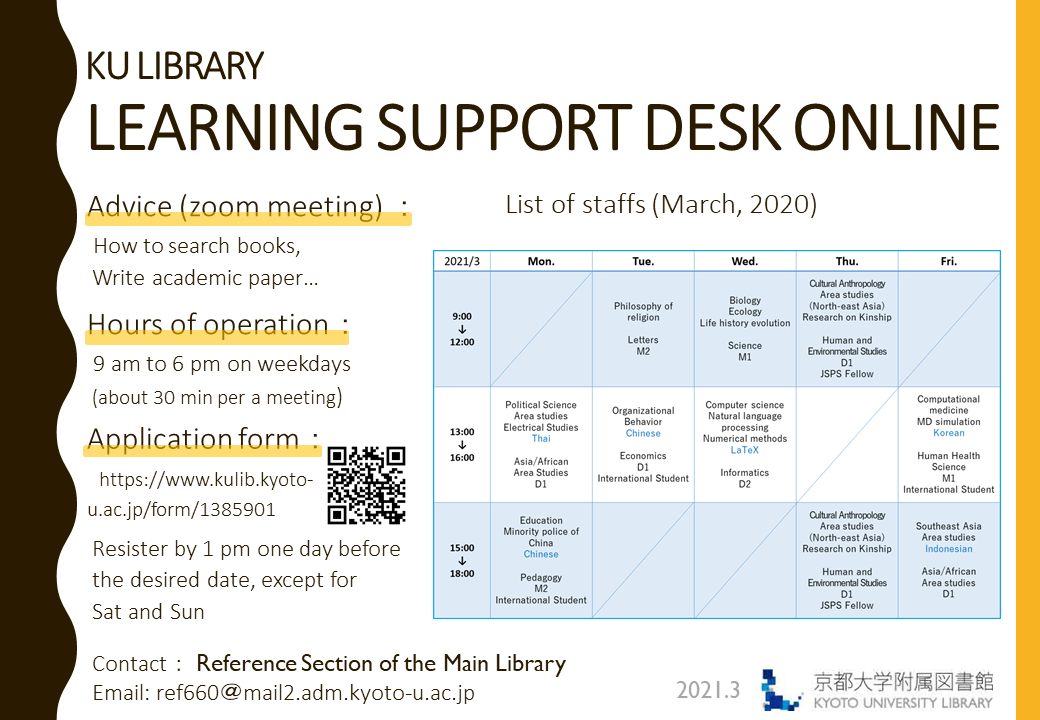
We are delighted to introduce our learner support via online.
Main Library will starts it from June 8, 2020.
Staffs from Learning Support Desk who are graduate students offer advice through Zoom to help you learn online, search books, or write academic paper.
All of them speak both English and Japanese fluently.
Please click here to make a reservation.
- Students of Kyoto University only.
Find more details about Learning Support Desk at https://www.kulib.kyoto-u.ac.jp/support/12334
List of staffs (second semester, 2020)

Notice
■ Hours of operation: 1 p.m. to 7 p.m. on weekdays (about 30 min per a meeting)
Please make sure to register by 1 p.m., one day before the desired date,except for Saturday and Sunday.
■ If you are looking for advanced advice on your own field, see the list of staffs to find their fields of study.
■ Once your reservation is confirmed, we will inform you by email with details including URL for the online meeting.
Contact: Reference Section of the Main Library
TEL: 075-753-2636
Email: ref660 at mail2.adm.kyoto-u.ac.jp
[附属図書館 利用支援掛]
Solved!: [Trouble] RefWorks (10 Jan)
Solved! (2020/06/04 17:10)
There is access trouble again.
Solved! (2020/03/26 17:45)
Currently, the error has occurred in RefWorks. You can't import information directly from the following databases.
・Ichushi Web・Ovid・Scopus
Sorry for inconvenience.
[Main Library Academic Support Section]
[Main Library] Guide for Freshman
We open the webpage "Guide for Freshman" of Main Library.
https://www.kulib.kyoto-u.ac.jp/mainlib/service/freshman
[Ebooks] Trial Access to the "Kinokuniya Digital Library (KinoDen)" (29 May 2020 - 31 Jul 2020)
Now KINOKUNIYA COMPANY LTD. provides a trial access to ebooks on "Kinokuniya Digital Library (KinoDen)" in response to COVID-19 pandemic. (for Kyoto University members)
During the campaign, you can read them in 5 minutes.
KinoDen contains more than 19,000 titles of Japanese ebook titles representing a broad range of academic subject matter.
Period
- 29 May 2020 - 31 July 2020
Contents
- More than 19,000 titles of Japanese ebooks published by about 110 publishers
URL
- Kinokuniya Digital Library (KinoDen)
https://kinoden.kinokuniya.co.jp/KyotoUniversityLibrary/
Access
- Access https://kinoden.kinokuniya.co.jp/KyotoUniversityLibrary/ via on-campus network.
- Search by the specific title of a ebook or click "検索" button.
- Click "閲覧開始" or "試し読み" button, then click "試し読みを続ける" link to start reading.
Attention
- On a trial access, you cannot print and download ebooks.
- Access ebooks from off campus via an IKEv2 connection or a designated "Plug-in"
*The "Plug-in" is not compatible with iOS and Android.
When you read the above-mentioned ebooks using iOS and Android devices, please set up the IKEv2 VPN connection.
Contact:
Kyoto University Library Electronic Resources Section.
https://www.kulib.kyoto-u.ac.jp/form/14106