[Important] Introduction of Multi-Factor Authentication for E-Journal and Database Access
*Multi-factor authentication has been introduced. Please refer to the explanation below when using it. (2026.2.19).
*Added a note that short-term IDs are not subject to multi-factor authentication (no one-time password required) (2025.12.25).
Starting Thursday, February 19, 2026, as part of our security enhancement measures, we will introduce the university's multi-factor authentication (at our university, "two-factor authentication" combining two elements) operated by the Institute for Information Management and Communication for access to electronic journals and databases.
There will be no major changes to the procedure itself, but the login screen flow and input fields will change. This is the same as logging into student email (KUMOI) or faculty/staff email (KUMail).
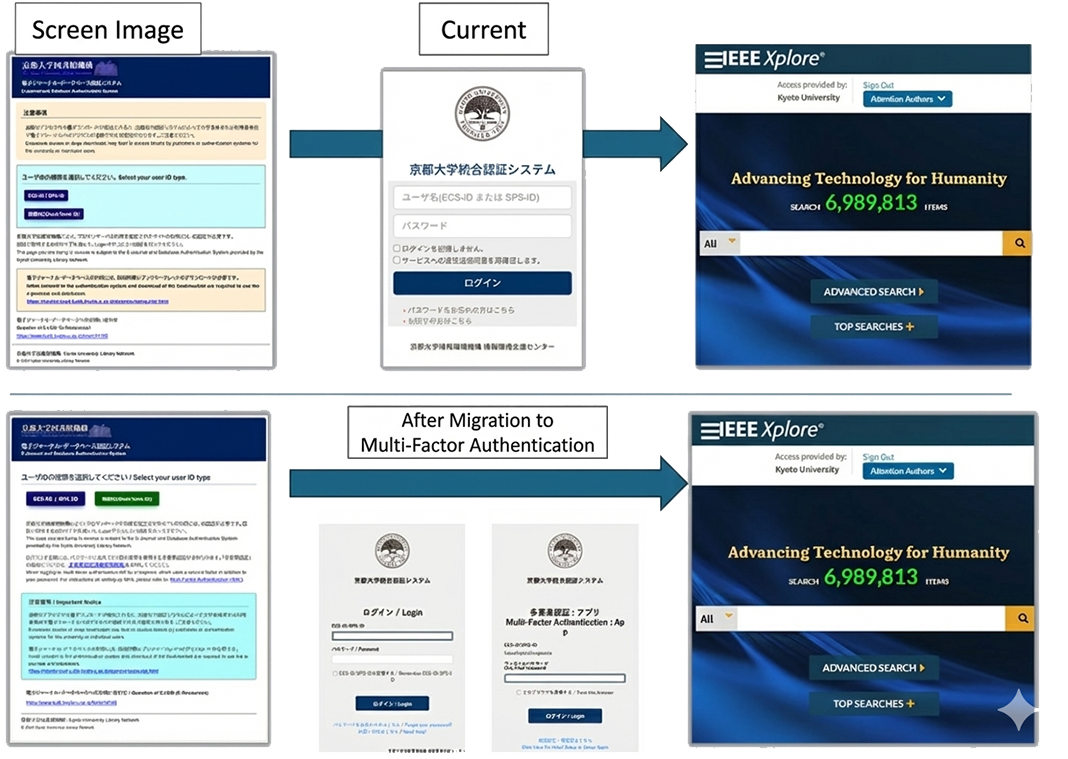
With the introduction of multi-factor authentication, in addition to your ECS-ID/SPS-ID and password, you will need to enter a "one-time password" generated by your smartphone or an authentication app.
*Access with a short-term ID is not subject to multi-factor authentication (no one-time password is required).
1. Overview of Changes
In addition to conventional ID and password authentication, we will require a second factor (one-time password) for identity verification, thereby improving the security level.
This will reduce the risk of unauthorized use due to leakage of IDs and passwords.
| Before Change (Current) | ECS-ID or SPS-ID + Password |
|---|---|
| After Change (From February 19, 2026) |
1. ECS-ID or SPS-ID + Password 2. One-Time Password (6-digit or 8-digit number) *If you use a short-term ID, a one-time password is not required. |
2. How to Use After Multi-Factor Authentication Introduction
The basic flow of "clicking the bookmarklet to authenticate" remains unchanged.
Connection Procedure
*Please enter the code from an authenticator app such as Google Authenticator, a browser extension, or an email notification.
3. Advance Preparation Required
To use multi-factor authentication, you need to complete the university-wide multi-factor authentication setup in advance.
If you have not yet completed the setup, please refer to the following manual.
Multi-Factor Authentication Getting Started Manual (Institute for Information Management and Communication)
https://u.kyoto-u.jp/mfa-start-en
[Contact]
Main Library, Electronic Resources Team
https://www.kulib.kyoto-u.ac.jp/form/14106?lang=en

- Service restored -[Maintenance] Kyoto University Rare Materials Digital Archive (Aug. 18) (2026-08-13)
- (Resolved) [System Trouble]KULINE (2026-08-13)
- [Maintenance] "KURENAI" "KURENAI Deposit System" will be temporarily inaccessible(08/13 7am-2pm) (2026-08-05)
- [Library Network] Conditions of Use and Licensing Restrictions for E-Resource (2026-08-03)
- [Library Network] Kyoto University Library Stamp Collecting in Open Campus 2026 (Aug. 6-7) (2026-07-31)
- [Maintenance] Kyoto University Library Network Web sites and related websites (Aug. 14, 2026) (2026-07-30)
- Service restored -[Maintenance] Kyoto University Rare Materials Digital Archive (Aug. 13) (2026-07-30)
- [Maintenance] "KURENAI" "KURENAI Deposit System" will be temporarily inaccessible(07/30 8:00-11:00) (2026-07-29)
- [Completed][Maintenance] Temporary Suspension of Library Network Services (KULINE, etc.) (A few minutes between 8:00-9:00 on Aug. 17, 2026 ) (2026-07-28)
- [Maintenance]Temporary Suspension of Services Using Short-term IDs for E-resource Access (Friday, Aug. 7, 2026, at 12:00 JST) (2026-07-24)
