[Solved]【Emergency Maintenance】Temporary Service & Login Disruption for JapanKnowledge Lib
The issue has been resolved. We apologize for the inconvenience. (October 22, 2026)
JapanKnowledge Lib is currently unavailable due to security maintenance.
We will issue another notice as soon as the service resumes.
We apologize for any inconvenience caused and appreciate your patience until the service is restored.
[E-Resources team, Kyoto University Main Library]
[Main Library] Rare Materials exhibited outside Kyoto University during AY2025
- Past exhibitions
- 令和6年度 Academic year 2024 exhibitions
- 令和5年度 Academic year 2023 exhibitions
- 令和4年度 Academic year 2022 exhibitions
- 令和3年度 Academic year 2021 exhibitions
- 令和2年度 Academic year 2020 exhibitions
- 平成31/令和元年度 Academic year 2019 exhibitions
- 平成30年度 Academic year 2018 exhibitions
- 平成29年度 Academic year 2017 exhibitions
- 平成28年度 Academic year 2016 exhibitions
- 平成27年度 Academic year 2015 exhibitions
- 平成26年度 Academic year 2014 exhibitions
[Main Library] Special Exhibition: "IT Books Recommended by Professionals"
[Main Library, Yoshida-South Library, Katsura Library] KURENAI 20th Anniversary Exhibition (Oct 19–)
An exhibition celebrating the 20th anniversary of Kyoto University Research Information Repository "KURENAI" will be held at the Main Library, Library, Yoshida-South and Katsura Library.
Coinciding with International Open Access Week (October 19–25, 2026), materials highlighting open access initiatives will be on display. In addition, a "Keyword Quest" will be hosted at the Main Library venue and on the special website. We look forward to your visit!
[Yoshida-South Library & Katsura Library Venues]
Dates:
Monday, October 19 – Friday, November 13, 2026 (during library opening hours)
Locations:
Yoshida-South Library: 1st Floor Entrance Hall (Closed on Oct 28)
Katsura Library: 1st Floor Lounge (Closed on Oct 30)
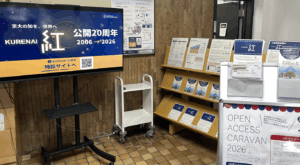 Yoshida-South Library[/caption][caption id="attachment_1410200" align="alignnone" width="300"]
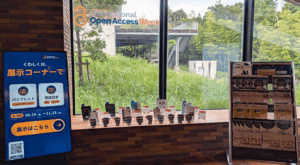 Katsura Library[/caption]
[Main Library Venue] ★ Keyword Quest★
Dates:
Monday, October 26 – Monday, November 30, 2026 (during library opening hours)
Location:
Main Library, 1st Floor Learning Commons
Eligibility:
Kyoto University members only (Content available in Japanese only)
Collect keywords from the exhibition posters and the KURENAI 20th Anniversary special website to get exclusive merch!— plus an extra bonus prize for collecting all keywords!
- How to Participate:
1: Check the exhibition posters and the special website.
2: Find and note down the hidden keywords from both the posters and website.
3: Get your original merchandise at the Main Library Service Desk! - Prize Redemption Location:
Main Library: 1st Floor Service Desk - Hours:
Weekdays 9:00–20:00 / Weekends & Holidays 10:00–18:00
During the exhibition period, each library will also host seminars and individual consultation sessions on Open Access.
Click here for more information: Open Access Caravan
[Related Websites]
KURENAI 20th Anniversary Special Site
International Open Access Week (2026 Theme: "The Cost of Knowledge")
[Related News]
https://www.kulib.kyoto-u.ac.jp/bulletin/1410079
https://www.kulib.kyoto-u.ac.jp/bulletin/1410127
[Main Library] repository [at] mail2.adm.kyoto-u.ac.jp
[Yoshida-South Library] a30yslib[at]mail2.adm.kyoto-u.ac.jp
[Katsura Library] 090stosho[at]mail2.adm.kyoto-u.ac.jp
[Main Library] Talk Event: "The Uninhibited Songs of the Ancients — Re-reading the Classic of Poetry (Shijing)" (Nov 5th)
The Shijing is the oldest collection of Chinese poetry, comprising 305 pieces. While it has been read through the ages as a canonical text for teaching Confucian morality, it also contains—perhaps surprisingly—a great many poems of pure, romantic love.
We are pleased to invite Professor Kozo Kawai, a leading authority on classical Chinese poetry, to join us:
"The Uninhibited Songs of the Ancients: Re-reading the Classic of Poetry (Shijing)"
* This event will be held in Japanese.
* This event is open to KU members only.
In the first part, Professor Kawai will discuss his own research.
In the second part, we will hold a reading session focusing on several poems from the Shijing.
The session will begin with an exposition by Professor Kawai, followed by a discussion among the participants as they explore and appreciate the poems.
Rather than asking what the "correct" answer is, let’s each come up with our own—perhaps rather arbitrary—interpretations.
Why not explore the true essence of the Shijing through a fresh, unconventional interpretation, unconstrained by tradition?
Registration is required for the second part. Please see the event overview below.
Event Overview
・Date & Time: Thursday, November 5, 2026, 5:00 PM – 6:30 PM
・Venue: Learning Commons, 1st floor, Main Library
・Speakers:
Kozo Kawai, Professor Emeritus [Profile]
(Moderator) Bunri Usami, Specially Appointed Professor (Graduate School of Advanced Integrated Studies in Human Survivability) [Profile]
・Eligibility: Open to university members only; priority given to students
・Event Details:
[Part 1] Lecture (30 minutes) – 30 seats available (standing room also open). No registration required; please simply arrive at the venue.
[Part 2] Book/Reading Discussion (1 hour) – Limited to 10 participants. Registration required; please sign up via the participation form:
Participation Form: https://forms.gle/VEmyB8XYDCJMW2DY7
* Registration deadline: Friday, October 30, 2026, at 5:00 PM.
* Registered participants will receive the poem to be discussed, along with supplementary materials featuring commentary by Professor Kawai. Please review these in advance and prepare your own interpretation.
* Those who have not registered are also welcome to attend as observers. We look forward to seeing you there.
・Organizer: Kyoto University Main Library
・Contact:
User Support Division, Kyoto University Main Library
E-mail: user-support-full660 [at] mail2.adm.kyoto-u.ac.jp