New Features in the Library Catalog (Kyoto University Doctoral Dissertations)
In the new Kyoto University Online Catalog(KULINE), you can search the doctoral dissertation.In addition, the following features have added.
- You can search various materials together with the dissertation.
From the authors name or article title, you are now able to search together not only dissertation but also books, serials, e-books and e-journals.

In addition to the dissertation of Mr. Yu Fujikawa, you can search atonce, such as books and serials.
※As usual, you can also search for only dissertation.
- You can see the Kyoto University Research Information Repository.
From the search results, you can see Kyoto University Research Information Repository (KURENAI).
You can access the text and the abstract of the dissertation published in the KURENAI.

※Dissertation since 2000 are available(As of August 23, 2012) . We are going to do the maintenance data back in the future.
- You can see the information of the book, which was submitted as dissertation.
From the search results, you can see the title, holdingslist,etc.

This feature is limitted to the book which is in the Kyoto University Library collection.
◆Kyoto University Doctoral Dissertations
https://www.kulib.kyoto-u.ac.jp/modules/search/index.php?content_id=16
Maintenance : MyKULINE will be not available while the system update (Aug 29)
現在、大学内の一部のネットワーク環境下において、MyKULINEにログイン出来ないことが判明しています。原因を調査しましたところ、MyKULINEのシステムを調整することにより、回避出来ることが判明しました。
つきましては、システムの設定作業の為、下記の時間帯につきまして、MyKULINEの利用を一時的に休止いたします。ご不便、ご迷惑おかけしますが、御了承ください。
- 日 時:平成24年8月29日(水) 18:00から19:00の間(予定)
- 休止する機能:MyKULINEへのログイン。予約、利用状況確認、複写・貸借依頼、アラート等のログインが必要な機能すべて。
◎通常の蔵書検索などは、使用出来ます。作業が終了し次第、お使いいただけるようになります。
【ログイン出来ない環境】
図書館・室の閲覧スペースにあるKULINE検索用の端末のうち、一部。
学内無線LANのeduroam
*なお、学術情報メディアセンターが設置する教育用コンピュータシステムのPC端末からは問題なく、ログイン出来ている事を確認しています。
http://www.iimc.kyoto-u.ac.jp/ja/services/ecs/account/satell.html
New features introduced in KULINE
- 画面を一新
- デザインを改め、より使いやすく、かつ豊富な情報が得られるよう、多くの機能を付加しました。
- ひとつの検索窓で様々な資料が検索可能に
- 検索時に資料種別を意識せずに、ひとつの検索窓からタブ切替で、様々な資料を検索できるようになりました。今までの図書・雑誌・電子ジャーナル・電子ブックスに加えて、論文(京大ArticleSearch)、貴重資料、博士論文、京都大学学術情報リポジトリKURENAI等のコンテンツが横断的に検索できます。
- 目次、内容紹介や書影が表示可能
- 図書の書誌詳細画面では、書誌情報のほかに目次や内容紹介、書影が表示できるようになりました。
- 検索結果件数が多くても絞り込み可能
- 検索結果件数が多くて、探しているものが見つけにくい場合、検索結果から分析された著者名や件名、出版年、所蔵館等の絞り込み条件が表示され、目的の資料にたどり着きやすくなります。
なお、URLが変更になります。お手元のパソコンにおけるブックマーク(お気に入り)登録や、リンクについては新URLに置き換えていただきますようお願いします。
-
新しいKULINEの機能と操作をご紹介するレファレンスガイドをご用意しています。
- 京都大学蔵書検索KULINEの使い方

- コピーや図書の取り寄せ方
- MyKULINEの使い方(貸出更新・予約編)
- MyKULINEの使い方(新着アラート・マイフォルダ編)
関連サイト:京都大学広報, 開発元プレスリリース
When I cannot access KULINE.
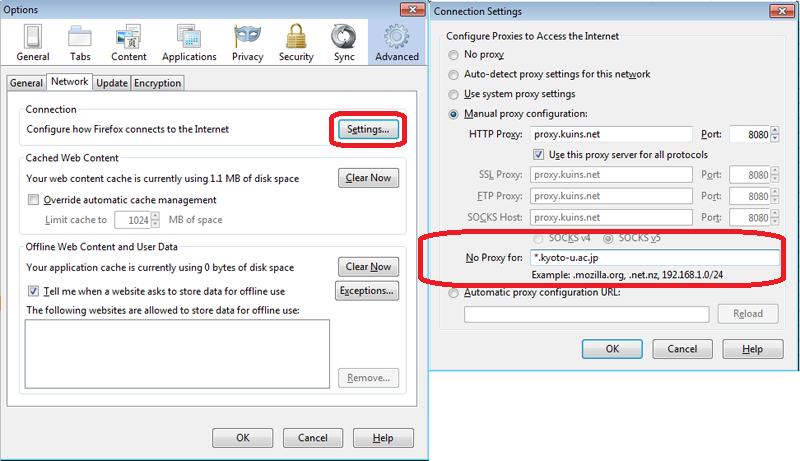
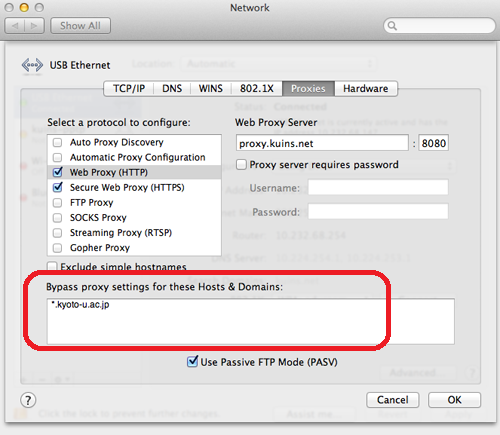
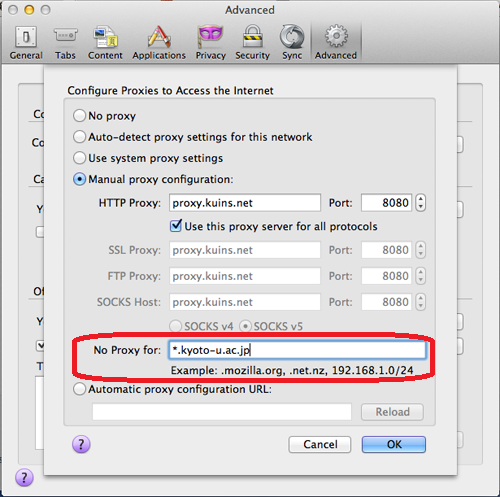
You cannot access KULINE if you don't use proxy server for addresses beginning with the following.
Please delete the following addresses at the Exceptions field when you access KULINE.
- The Main Library website *.kulib.kyoto-u.ac.jp
- Kyoto University website *.kyoto-u.ac.jp
Browser Settings
Windows Internet Explorer, Google Chrome, Safari and so on
There is the setting at [Control Panel - Internet Options - Connections - Local Area Network(LAN) Settings - Proxy server
- Advanced].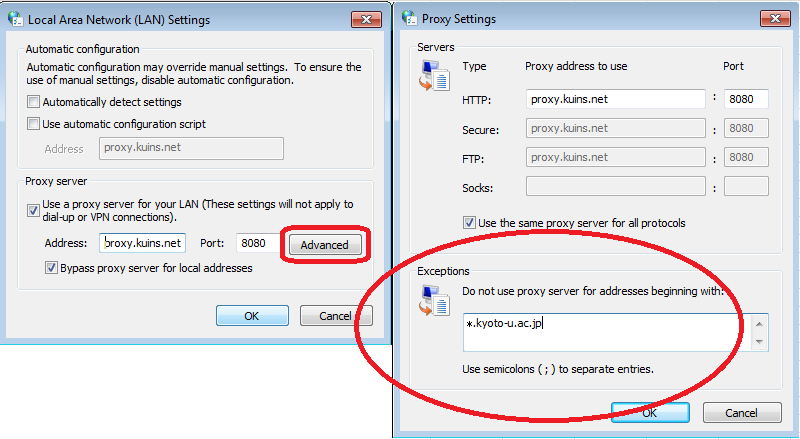
Windows Firefox
Mac Safari, Google Chrome and so on
There is the setting at [System Preferences - Network - Proxies].
Mac Firefox
The URL of KULINE was changed!
The URL of KULINE was changed!
Ref. https://www.kulib.kyoto-u.ac.jp/bulletin/11033
The old URL : https://op.kulib.kyoto-u.ac.jp/webopac/catsrk.do
The new URL : https://kuline.kulib.kyoto-u.ac.jp/
Please replace the old URL by the new one if you register the URL of KULINE in the bookmark or favorite menu on your PC.
[Kyoto University Library Network]