[Library Network : for KU members] The APC Support Program for Accelerating Open Access
In February 2024, the basic policy for the realization of immediate open access to academic papers, etc. (hereinafter referred to as the “National OA Policy”) was decided at the Integrated Innovation Strategy Promotion Council.
In the case of Kyoto University, researchers who will receive Grants-in-Aid for Scientific Research, etc. publicly solicited from FY2025 onward will, in principle, be required to register their peer-reviewed academic papers including the author's final version and evidence data that are the result of the research grant in the Kyoto University Academic Information Repository "KURENAI" and other services.
Kyoto University has already established an open access policy and has developed the "KURENAI". But, as a response to this national OA policy, to further promote the Kyoto University Open Access Policy, the Kyoto University Library Network will subsidize the APC (Article Processing Charge, hereinafter referred to as "APC") for researchers who make their articles open access.
For a list of eligible journals, article types, and other detailed application requirements, the following URL.
-
Faculty and Staff Groupware
[Library] The APC Support Program for Accelerating Open Access
https://ku1.cybozu.com/g/bulletin/view.csp?cid=54&aid=19587
This project is funded by the grant "Open Access Acceleration Project https://www.mext.go.jp/b_menu/boshu/detail/1421775_00008.htm" for FY2024 only.
The support program will be implemented only in FY2024, and will not be implemented in FY2025 or later.
Please note that this program does not constitute the Library Network's endorsement of submissions to any particular publisher.
Contact:
Research Support Division, Kyoto University Library
E-mail: oa-kasokuka [at] mail2.adm.kyoto-u.ac.jp
Posted: 2024-07-25
[Library Network][Attention!] Regarding Bulk Access to Electronic Resources Due to Automatic Download Features of Reference Management Tools and Browser Preloading Functions
Electronic resources such as e-journals, e-books, and databases are subject to access restrictions. Accessing a large number of resources in a short period of time may be considered a violation of the terms of use, and could result in Kyoto University's access to these resources being blocked by the provider.
→Conditions of Use and Licensing Restrictions for E-Resources
Recently, there have been frequent cases of unintentional large-scale downloads and access caused by the automatic download functions of reference management software and the "link preloading function" of web browsers.
These "automatic download" and "link preloading" functions repeatedly access electronic journals in the background, even when you are not aware of it. This can lead to a large number of downloads and accesses being made without your knowledge.
Please review the following information and check the settings and usage methods of your reference management software and web browser.
Precautions and settings for reference management software
-
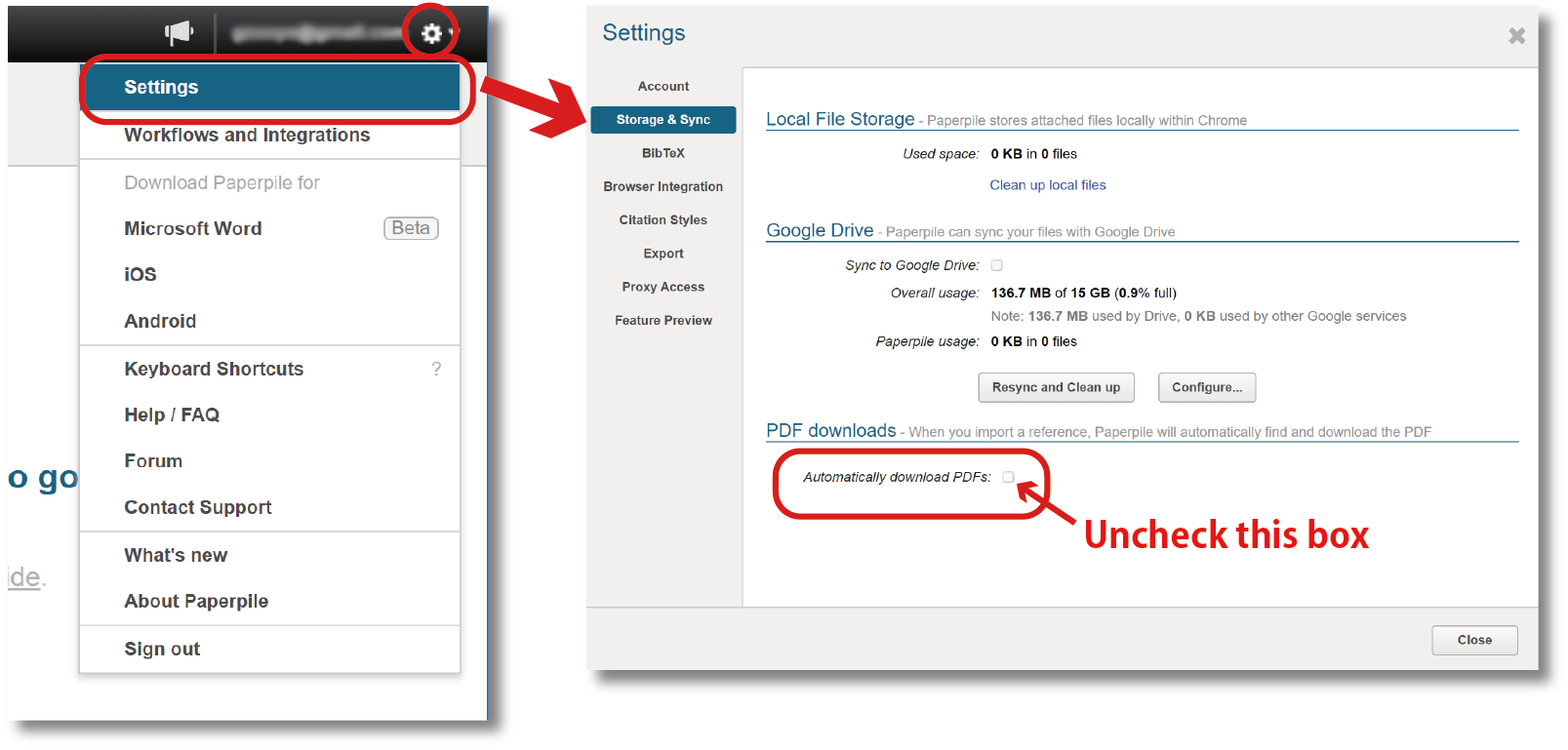
Paperpile
Click the gear icon in the top right corner of the screen. Go to Settings > Storage & Sync. Uncheck the "Automatically download PDFs" box.
Please note: If this box is checked, PDFs will be downloaded for all references, especially when "Auto-Update" is performed after migrating from another software.
-
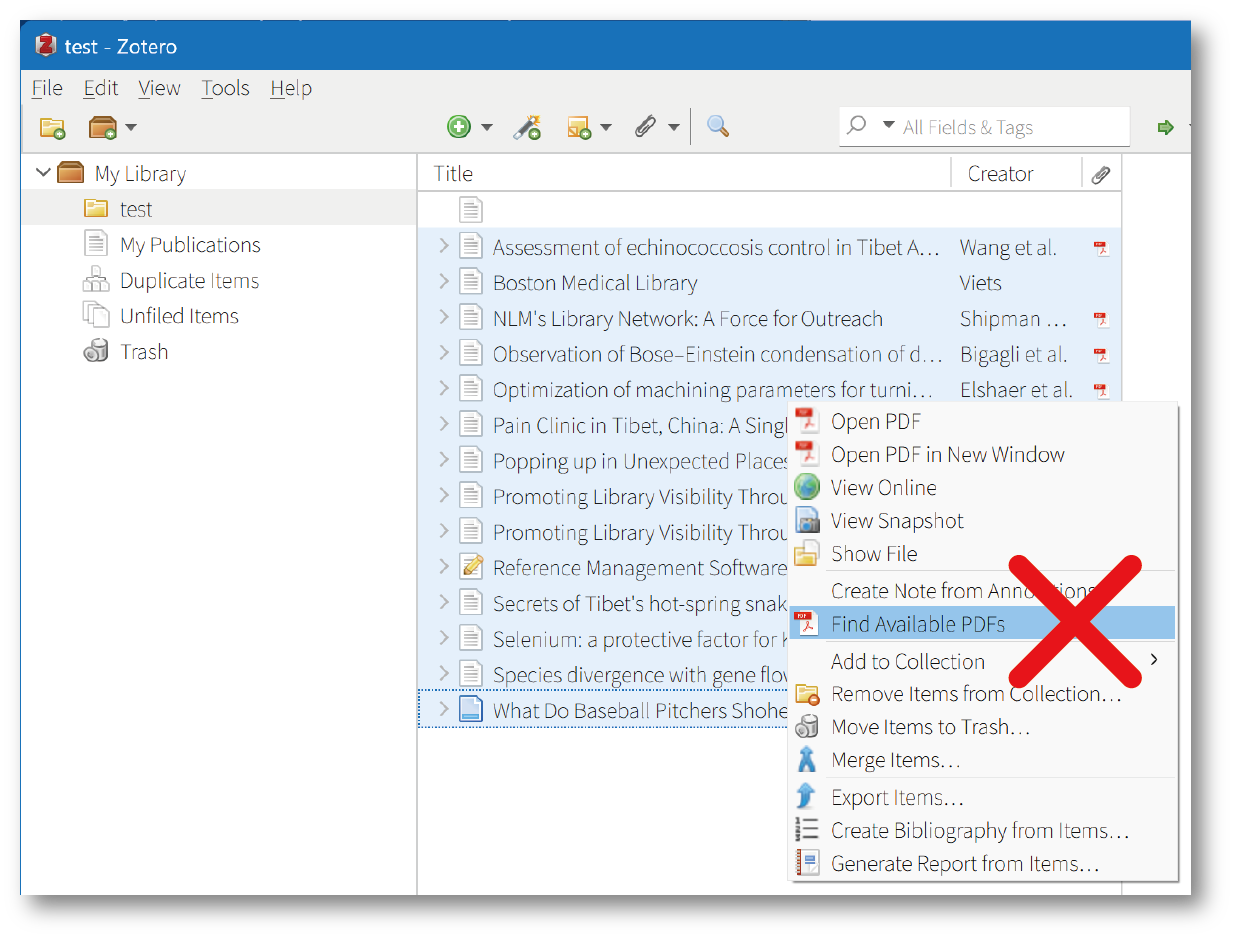
Zotero
Right-click on an item in the item list and select "Find Available PDFs" to automatically download the PDF. Avoid downloading PDFs when multiple items are selected.
-
ReadCube Papers
Select "LOCATE PDF" from the reference list to download the PDF. Avoid selecting multiple items at once, as this may be considered a large-scale download.
[For reference] Bulk Downloading PDFs in your Papers Library
-
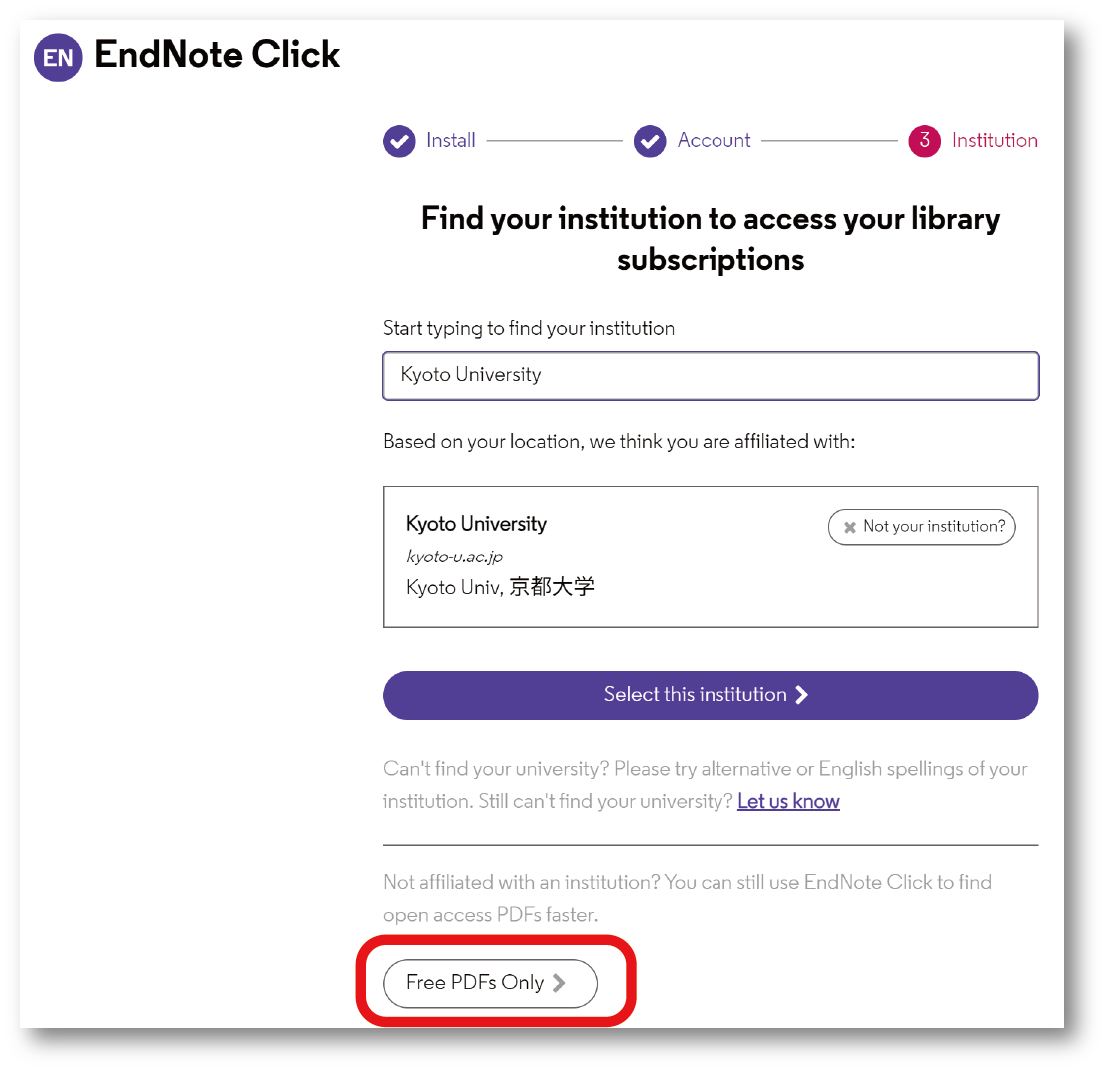
EndNote Click (browser extension)
If this extension is active while searching a reference database, it may attempt to download all reference information and full-text PDFs at once, which could be considered a large-scale download. Disable this extension or, if you must use it, do not register your affiliation in the account settings and set the option to "Free PDFs only".
-
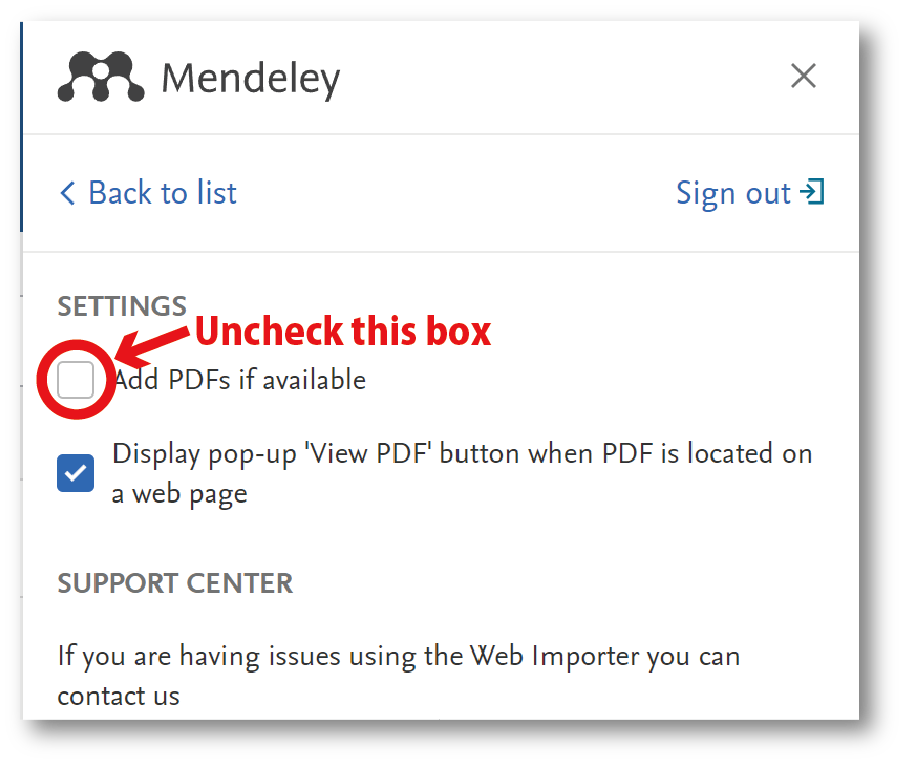
Mendeley Web Importer (browser extension)
This extension has a function to automatically collect reference bibliographic information and full-text PDFs from the displayed page. This could be considered a large-scale download, so disable this extension or, if you must use it, uncheck the "Add PDF if possible" box in the settings.
Do not use the automatic download function of any other reference management software.
How to disable the "link preloading function" in each web browser
-
Microsoft Edge (Chromium version)
- Go to Settings > Cookies and site permissions > Manage and delete cookies and site data.
- Turn off "Preload pages for faster browsing and searching".
-
Google Chrome
Go to Settings > Performance. Turn off "Preload pages".
-
FireFox
- In the URL bar, type "about:config" and press Enter.
- If a warning page appears stating "Proceed with Caution", click "Accept the Risk and Continue".
- In the search bar, search for "prefetch-next".
- If "network.prefetch-next" is set to "true", double-click it to change it to "false" (if it is already set to "false", do nothing).
-
Safari (Mac)
- Open Safari > Preferences.
- Go to the Search tab.
- Uncheck the box "Preload Top Hits in the background".
Please note: The specific settings and methods for disabling the "link preloading function" may vary depending on the version of the software. Please refer to the help documentation for your software if you are unsure.
[Library Network]
Solved: [Library Network] Access to American Chemical Society is rejected
Solved! (2024/06/27)
Kyoto University has been blocked from accessing content on the ACS Publications website due to an excessive download violation again. (2024/06/26)
Solved! (2024/06/25)
Kyoto University has been blocked from accessing content on the ACS Publications website due to an excessive download violation again.
Solved! (2024/06/22)
Kyoto University has been blocked from accessing content on the ACS Publications website due to an excessive download violation since the morning of June 20.
Publishers of e-journals and e-books are prohibited from accessing all pages, not only the full text, but also the table of contents and abstracts, with excessive frequency, thus overloading the servers.
If excessive access or large downloads are detected, penalties such as blocking access to e-journals from the entire university will be imposed by publisher.
Please read the "[Library Network] Conditions of Use and Licensing Restrictions for E-Resources" announced on March 1, 2024, and review the settings of your browser and reference management tool plug-ins.
Solved: [Library Network] Access to American Chemical Society is rejected
Solved! (2024/05/31)
Kyoto University has been blocked from accessing content on the ACS Publications website due to an excessive download violation since 18:30 a.m. on May 31.
Publishers of e-journals and e-books are prohibited from accessing all pages, not only the full text, but also the table of contents and abstracts, with excessive frequency, thus overloading the servers.
If excessive access or large downloads are detected, penalties such as blocking access to e-journals from the entire university will be imposed by publisher.
Please read the "[Library Network] Conditions of Use and Licensing Restrictions for E-Resources" announced on March 1, 2024, and review the settings of your browser and reference management tool plug-ins.
Solved: [Trouble] AIMS e-journals are not available
Fixed links to KULINE search results and links from e-journal and e-book listings.(May 15, 2024)
The AIMS Web site has been restored. However, the URLs of each journal have been changed, and the site is not accessible from the links in the KULINE search results and the links from the e-journal and e-book lists.
For the time being, please use the links for each journal on the AIMS top page(https://www.aimsciences.org).
AIMS (American Institute of Mathematical Sciences) website (https://www.aimsciences.org/) is currently inaccessible. Therefore, the electronic journals provided by AIMS are not available.
We apologize for any inconvenience caused.
Solved: [Trouble] Some e-journals cannot be accessed via the E-Journal and Database Authentication System
The following problems have been resolved. (2024/7/18)
Currently, there are some e-journals that cannot be accessed via the E-Journal and Database Authentication System.
When you access these e-journals via the authentication system, the following screen will appear.
The e-journals that are known to have this problem and how to deal with it for the time being are listed below.
LWW Journals
https://journals.lww.com/Please select a platform other than “LWW Online” on the detail screen of KULINE (Kyoto University Library Catalog).
[Example] Medical Care
https://kuline.kulib.kyoto-u.ac.jp/opac/opac_link/bibid/SB00160899
Select “Journals@Ovid” in the “Link” and “Coverage Range” table on the “KULINE (Kyoto University Library Catalog)” page.AACR(American Association for Cancer Research) Journals
https://aacrjournals.org/Please do not use the authentication system.
Equinox Journals
https://www.equinoxpub.com/home/journals/Please do not use the authentication system.
We apologize for any inconvenience caused.
Solved: [Trouble] Cannot access "SpringerLink"
"SpringerLink" is now accessible. (2024.4.3)
E-journal site "SpringerLink" is currently unavailable.
We apologize for any inconvenience this may cause, and ask that you please wait for a while until the database is restored.
Solved: [Trouble] Cannot access Annual Reviews Sciences Collection
Now accessible via the authentication system. (2024.3.26)
Currently, the Annual Reviews Sciences Collection is not available via the E-Journal and Database Authentication System. Not via links from KULINE or other sources, please use each title from
https://www.annualreviews.org/.
[Library Network : for KU members] Introduction of the Transformative Agreement with Elsevier and APC Discount
Kyoto University will introduce the transformative agreement with Elsevier that encompasses the Article Processing Charge (APC) and the e‐journals subscription fee from April 2024. Under this agreement, APC discounts will be applied to articles submitted to Elsevier journals eligible for OA publication by authors affiliated with Kyoto University.
The availability of APC discounts, discount rates, and payment methods vary by journal. Please refer to the following websites for details.
-
Elsevier APC Discount (On campus only)
https://www.kulib.kyoto-u.ac.jp/content0/1399874?lang=en
Please note that the transformative agreement does not imply that the Library recommends submissions to any particular publisher.
[Electronic Resources Section, Main Library]
Posted: 2024-03-19
Solved: [Library Network] Access to American Chemical Society is rejected
Solved! (2023.12.15)
Kyoto University has been blocked from accessing content on the ACS Publications website due to an excessive download violation since 11:00 a.m. on December 7.
We are currently requesting ACS to remove blocking.
If you are unable to access ACS contents via the authentication system, please review the following PDF (campus only).
https://www.kulib.kyoto-u.ac.jp/campus/ejdb/Confidential_ACS_Access_20231212.pdf
Publishers of e-journals and e-books are prohibited from accessing all pages, not only the full text, but also the table of contents and abstracts, with excessive frequency, thus overloading the servers.
If excessive access or large downloads are detected, penalties such as blocking access to e-journals from the entire university will be imposed by publisher.
Please read the "[Library Network] Conditions of Use and Licensing Restrictions for E-Resources" announced on December 1, and review the settings of your browser and reference management tool plug-ins.