[Library Network][Attention!] Regarding Bulk Access to Electronic Resources Due to Automatic Download Features of Reference Management Tools and Browser Preloading Functions
Electronic resources such as e-journals, e-books, and databases are subject to access restrictions. Accessing a large number of resources in a short period of time may be considered a violation of the terms of use, and could result in Kyoto University's access to these resources being blocked by the provider.
→Conditions of Use and Licensing Restrictions for E-Resources
Recently, there have been frequent cases of unintentional large-scale downloads and access caused by the automatic download functions of reference management software and the "link preloading function" of web browsers.
These "automatic download" and "link preloading" functions repeatedly access electronic journals in the background, even when you are not aware of it. This can lead to a large number of downloads and accesses being made without your knowledge.
Please review the following information and check the settings and usage methods of your reference management software and web browser.
Precautions and settings for reference management software
-
Paperpile
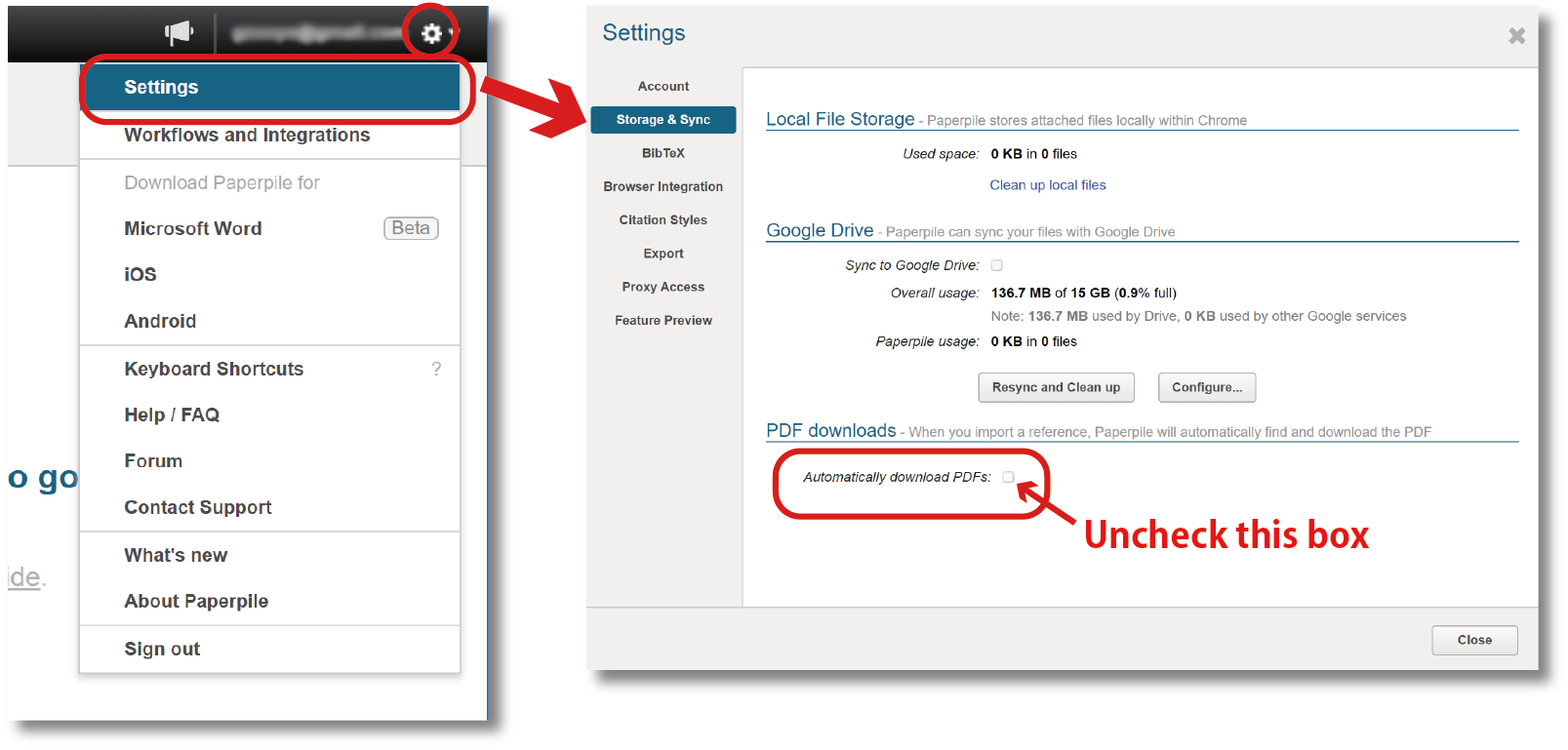
Click the gear icon in the top right corner of the screen. Go to Settings > Storage & Sync. Uncheck the "Automatically download PDFs" box.
Please note: If this box is checked, PDFs will be downloaded for all references, especially when "Auto-Update" is performed after migrating from another software.
-
Zotero
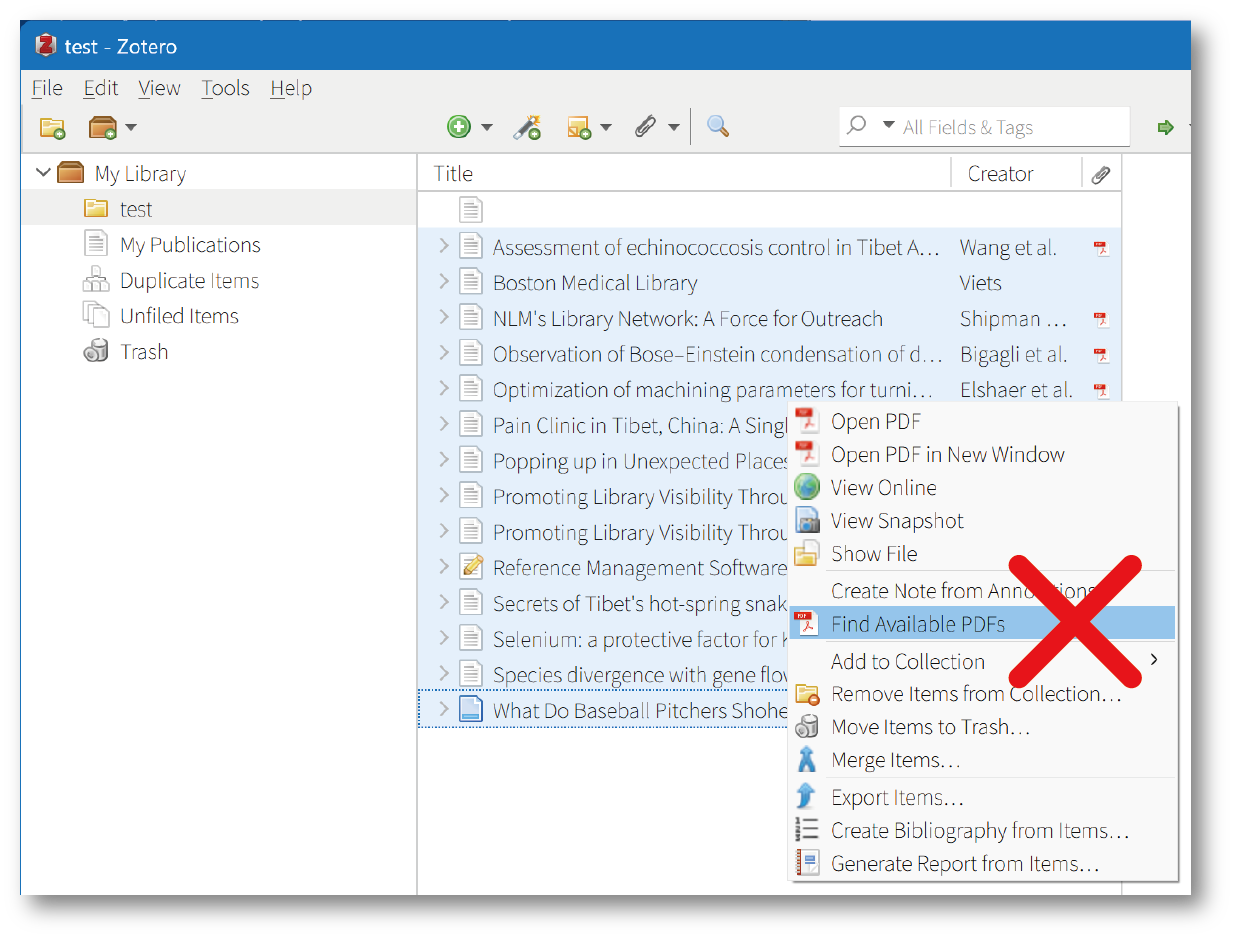
Right-click on an item in the item list and select "Find Available PDFs" to automatically download the PDF. Avoid downloading PDFs when multiple items are selected.
-
ReadCube Papers
Select "LOCATE PDF" from the reference list to download the PDF. Avoid selecting multiple items at once, as this may be considered a large-scale download.
[For reference] Bulk Downloading PDFs in your Papers Library
-
EndNote Click (browser extension)
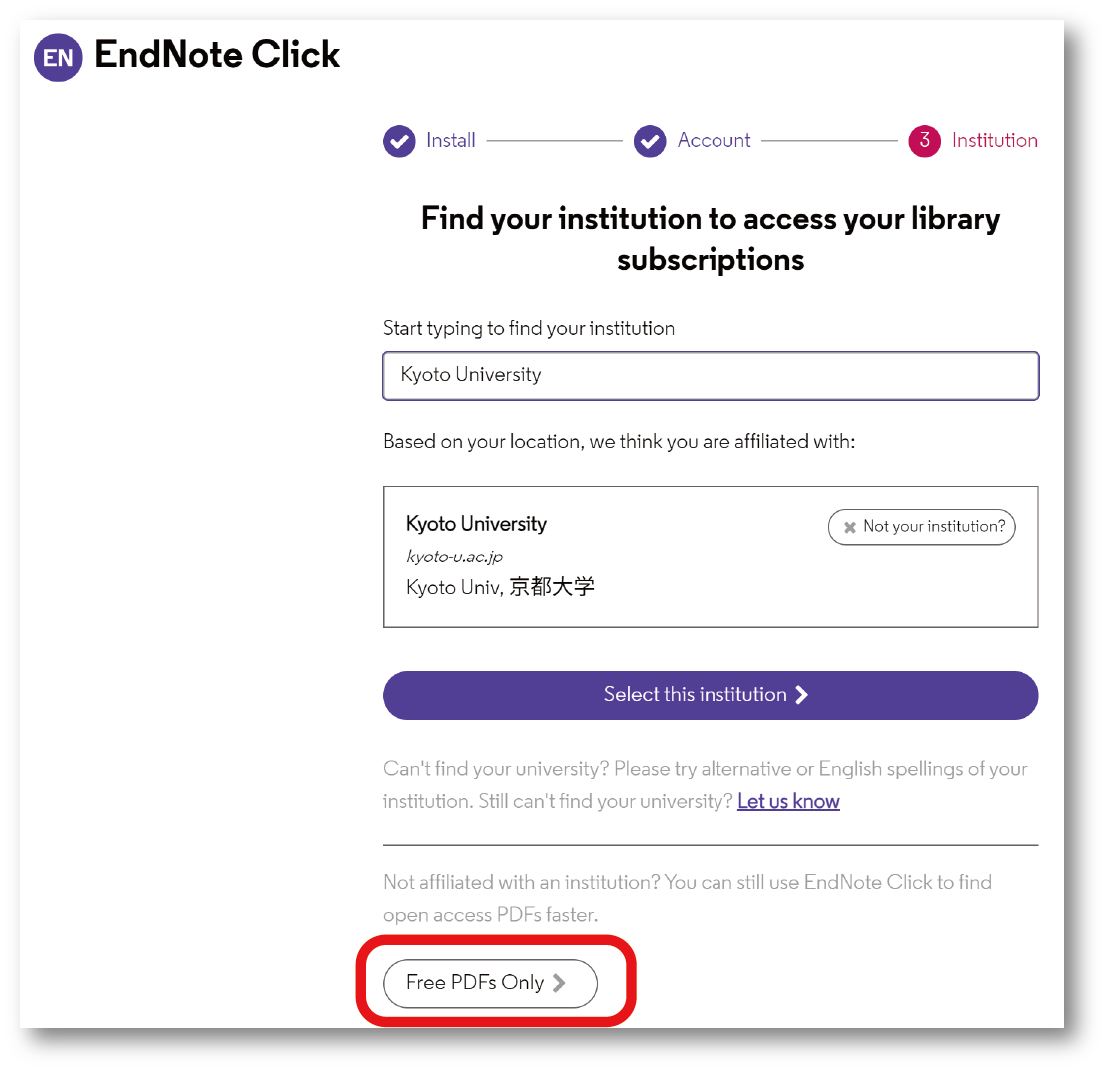
If this extension is active while searching a reference database, it may attempt to download all reference information and full-text PDFs at once, which could be considered a large-scale download. Disable this extension or, if you must use it, do not register your affiliation in the account settings and set the option to "Free PDFs only".
-
Mendeley Web Importer (browser extension)
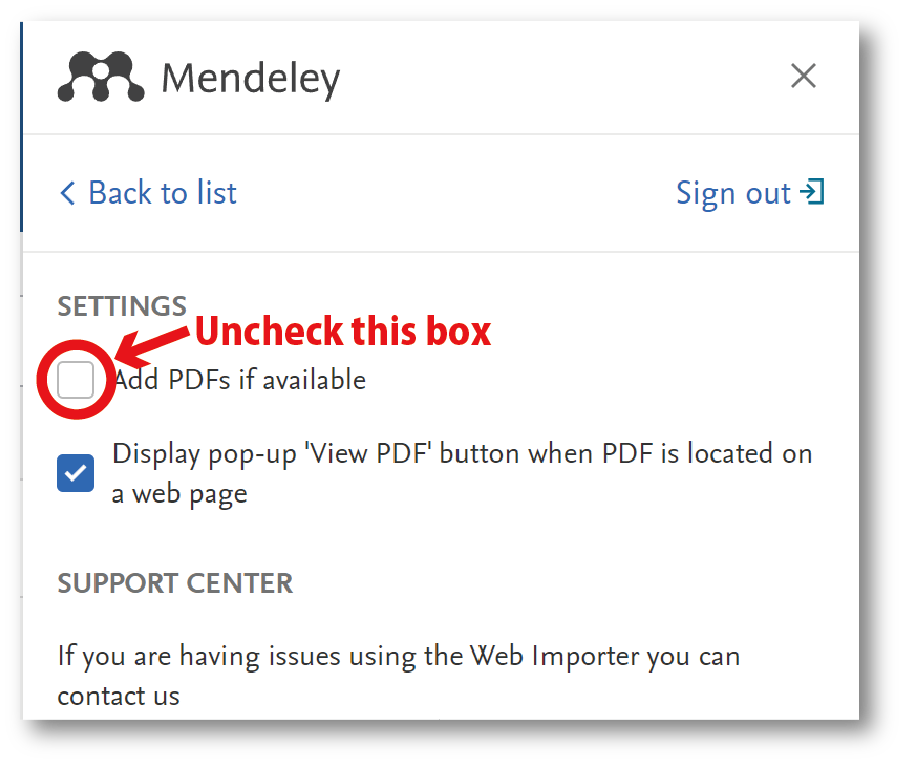
This extension has a function to automatically collect reference bibliographic information and full-text PDFs from the displayed page. This could be considered a large-scale download, so disable this extension or, if you must use it, uncheck the "Add PDF if possible" box in the settings.
Do not use the automatic download function of any other reference management software.
How to disable the "link preloading function" in each web browser
-
Microsoft Edge (Chromium version)
- Go to Settings > Cookies and site permissions > Manage and delete cookies and site data.
- Turn off "Preload pages for faster browsing and searching".
-
Google Chrome
Go to Settings > Performance. Turn off "Preload pages".
-
FireFox
- In the URL bar, type "about:config" and press Enter.
- If a warning page appears stating "Proceed with Caution", click "Accept the Risk and Continue".
- In the search bar, search for "prefetch-next".
- If "network.prefetch-next" is set to "true", double-click it to change it to "false" (if it is already set to "false", do nothing).
-
Safari (Mac)
- Open Safari > Preferences.
- Go to the Search tab.
- Uncheck the box "Preload Top Hits in the background".
Please note: The specific settings and methods for disabling the "link preloading function" may vary depending on the version of the software. Please refer to the help documentation for your software if you are unsure.
[Library Network]
Solved: [Trouble] "Sage Research Methods" is not available
Solved! (2024/07/17)
Contents of the database "Sage Research Methods" are currently unavailable.
We apologize for the inconvenience and ask for your patience while the system is restored.
[Trouble] Vocabulary search of the database "Waka, renga, haikai library" is not available
Currently, the vocabulary search of the database "Waka, renga, haikai library" is not working.
We apologize for the inconvenience, but please wait for a while until the system is restored.
Database List "wa"
https://www.kulib.kyoto-u.ac.jp/erdb?c=erdb_alpha_jw&lang=en
Maintenance: JapanKnowledge (Aug. 31 - Sep. 1, 2024)
JapanKnowledge service will be suspended due to its system maintenamce during the following period.
We
appreciate your support and patience.
Schedule
- August 31, 2024 (Sat) 21:00 - September 1, 2024 (Sun) 13:00 (Japan Time)
Suspended service
All JapanKnowledge Services (JapanKnowledge Lib, Select contents and JKBooks)
Database List "J"
https://www.kulib.kyoto-u.ac.jp/erdb?c=erdb_alpha_j&lang=en
[E-Resources team, Kyoto University Main Library]
【Trial】(-8/9)Database"ProQuest One Education"
(日本語)【医学図書館】米国医師資格試験対策ツール(Boards&Beyond、FirstAidForward)のトライアル提供を開始しました
【Trial】(-8/3)Database"O‘Reilly for Higher Education"
"O‘Reilly for Higher Education" contains ebooks, audiobooks, movies, case studies about informatics.
Please give it a try!
In order to login, please register your email address at the following URL:
https://www.oreilly.com/library-access/
They are four emails domains on your O'Reilly account:
@kyoto-u.ac.jp
@st.kyoto-u.ac.jp
@mail2.adm.kyoto-u.ac.jp
@i.kyoto-u.ac.jp
From the second time onwards:
https://www.oreilly.com/member/login/
Guide to create your account
https://proquest.libguides.com/ld.php?content_id=62144206
"Short Videos"(how to use platforms)
https://proquest.libguides.com/oreilly
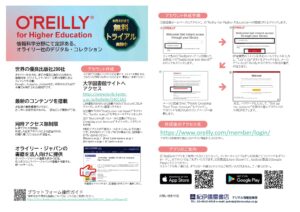
Poster [by KINOKUNIYA COMPANY, LTD.]
(Contact)
Graduate School of Informatics Library
Tel: 075-753-5390
E-Mail: 140tosho (at)mail2.adm.kyoto-u.ac.jp
Please replace (at) with @.
Maintenance: JapanKnowledge (May 25, 2024)
JapanKnowledge service will be suspended due to its system maintenamce during the following period.
We appreciate your support and patience.
Schedule
- 9:00 - 14:00 on Saturday, 25 May 2024 (Japan Time)
Suspended service
All JapanKnowledge Services (JapanKnowledge Lib, Select contents and JKBooks)
Database List "J"
https://www.kulib.kyoto-u.ac.jp/erdb?c=erdb_alpha_j&lang=en
[E-Resources team, Kyoto University Main Library]
[Database] About migration from "Lexis" to "Lexis+" (Lexis Plus)
On April 1, 2024, the database "Lexis" was replaced by "Lexis+" (Lexis Plus).
"Lexis+" adds the following menu items to the existing "Lexis" equivalent, "Legal Research"- Practical Guidance
- Litigation Analytics
- Document Analysis
- Legal News Hub
For more information, please refer to https://www.kulib.kyoto-u.ac.jp/erdb?c=erdb_alpha_l&lang=en
Solved: [Trouble] Cannot access Database "Lexis"
Lexis+ is now available. (2024.4.1)
The database "Lexis" is currently unavailable (will be migrated to Lexis+ on April 1, 2024).
We apologize for any inconvenience this may cause, and ask that you please wait for a while until the database is restored.